
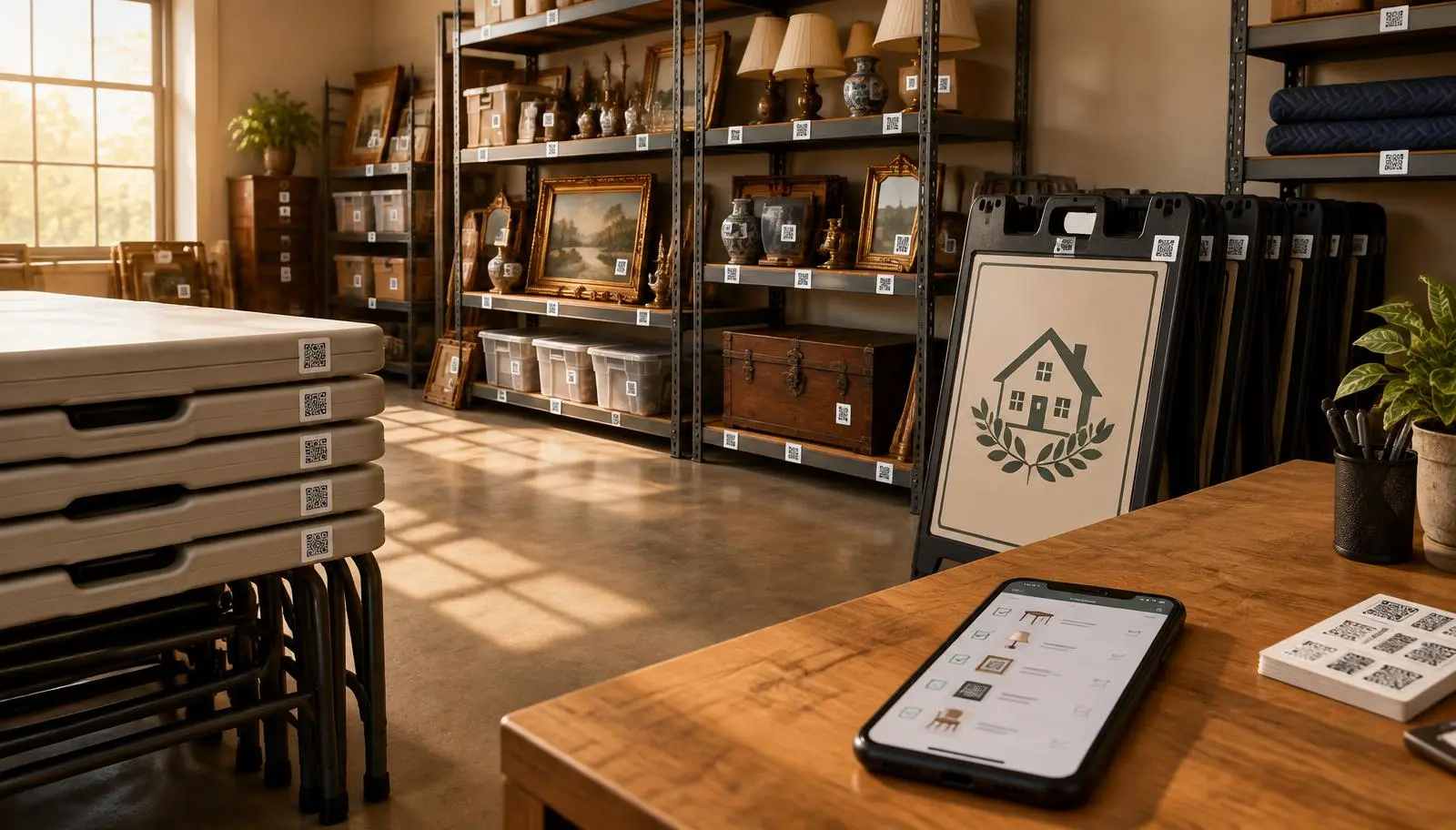
Stop Losing Tables, Signs, and Shelving: Equipment Tracking for Estate Sale Companies
Missing tables, forgotten signs, and equipment left at a client’s home quietly erase profit. See the real phone-first system that tracks what you own, where it is, and who has it.
A folding table left behind at a client’s home is not a small mistake. Neither is a sign stack sitting in the wrong trailer, shelving that nobody remembers loaning out, or a dolly that never came back from a teammate. These losses are frustrating, expensive, and usually discovered at the worst moment: while the crew is loading for the next sale.
EstateSaleFinder’s Equipment Manager gives estate sale companies and Booth Max sellers one place to see what they own, where every piece lives, where it went, who has it, what it cost, and what needs attention. It is included at no extra charge with Pro and Booth Max because we are doing everything we can to help members protect equipment, reduce replacement costs, and maximize profit.
The expensive problem hiding between sales
Equipment moves constantly. Tables leave the warehouse for Saturday’s estate sale. Signs ride in one teammate’s vehicle. Shelving stays at an antique mall. A checkout stand goes to a pop-up. Then the sale ends, everyone is tired, and the company’s reusable gear gets mixed into the cleanup.
- One forgotten table can cost more than a month of Pro.
- Missing signs can hurt traffic at the next sale.
- Unavailable shelving can delay setup and add labor.
- Buying replacements without knowing what you already own ties up cash.
- A crew member cannot return an item if nobody can tell them it is still assigned to them.
The answer is not a longer spreadsheet. It is a short field workflow: add it once, give it a home, move it when it leaves, and check it back in.
See the entire operation at a glance
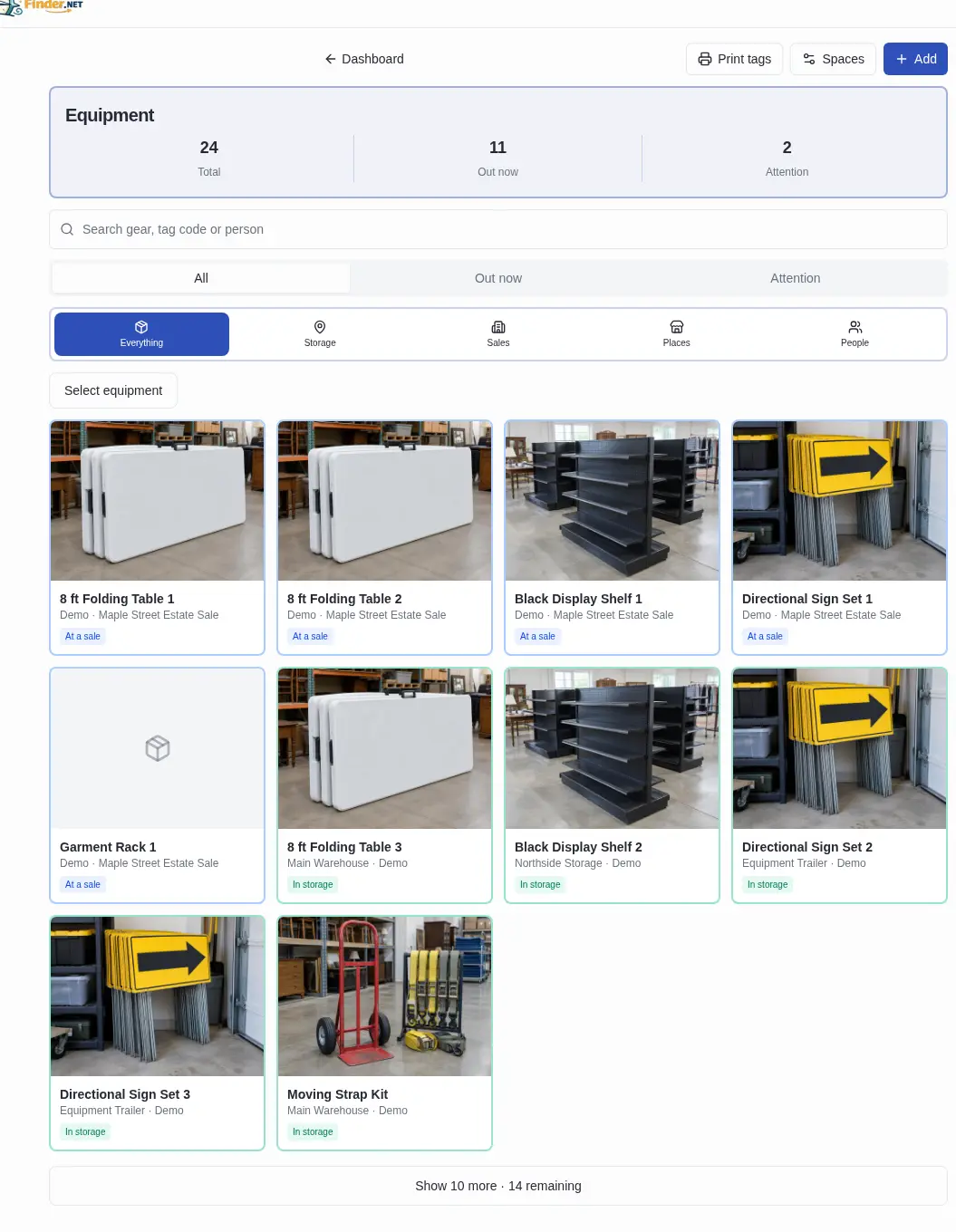
The main Equipment Manager shows the answers a busy owner needs immediately:
- Total equipment recorded
- Out now at a sale, client, booth, with a person, or elsewhere
- Attention for overdue or repair items
- Search by equipment name, tag code, or person
- Filter by Storage, Sales, Places, or People
- Photo cards that make similar items easy to identify
- A bounded list instead of an endless mobile scroll
This is a real EstateSaleFinder screen populated with clearly labeled fictional demo equipment. The locations, people, and sale are examples; the workflow is the working product.
Add one piece — or 250 at once
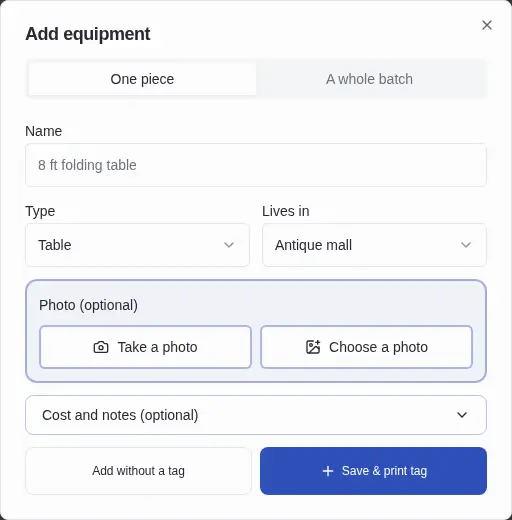
Add equipment by typing a name and optionally taking a photo with the phone camera. Choose its Type and its home Lives in location. If the right type or place does not exist, add it without leaving the flow; the new option synchronizes with the account’s Equipment Manager locations.
For stacks of matching gear, choose A whole batch. Enter “Folding table,” choose the quantity, and EstateSaleFinder numbers each piece automatically — up to 250 — while applying the photo, type, home location, and cost per piece.
QR tags are useful, but never required. Every save gives two clear choices:
- Add without a tag for a photo-and-text workflow
- Save & print tag when fast phone scanning is useful
Give every piece a real home
“Lives in” is not limited to a warehouse. It stays synchronized with the places the seller has added across the account, including:
- Warehouses, garages, storage units, trucks, and trailers
- Antique malls and individual booth numbers
- Storefronts, flea markets, shows, and pop-up markets
- Custom places a company creates for its own operation
- Multiple branches or franchise locations
That means a Booth Max seller can see what belongs at each antique mall, while an estate sale company can separate a warehouse, trailer, and branch inventory without maintaining parallel lists.
Move many tables or signs in one step
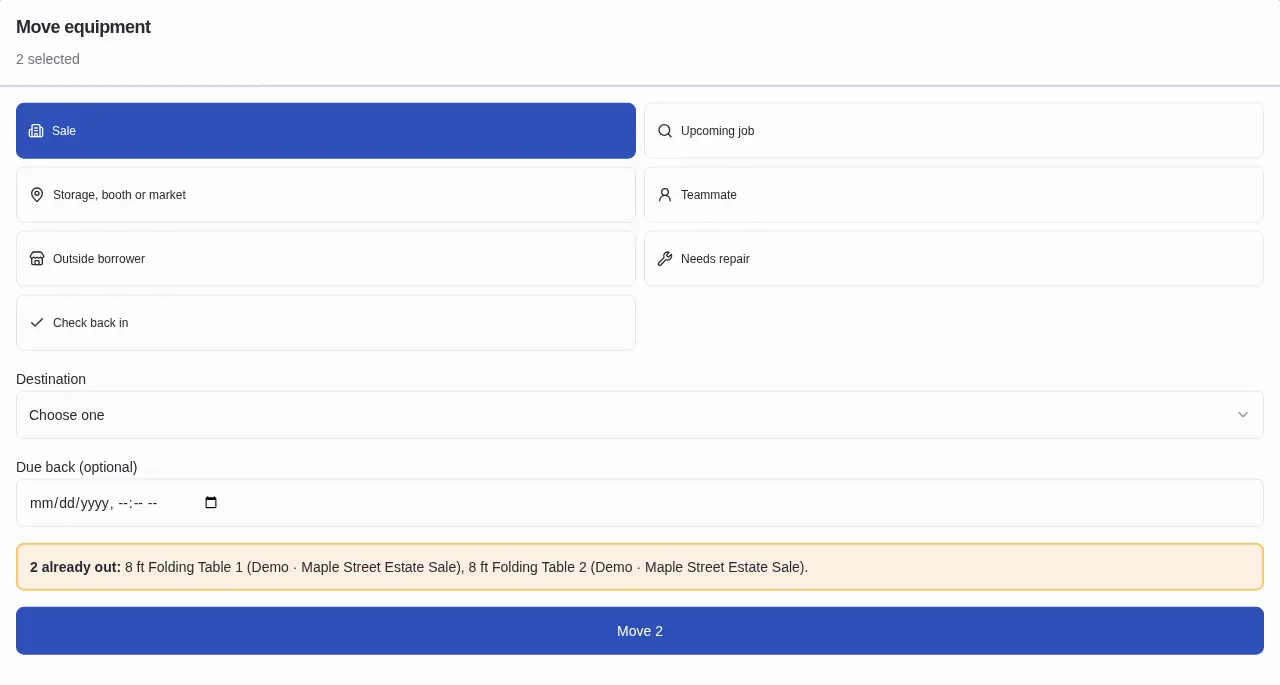
From Complete Inventory, tap Select equipment, choose any mix of tables, signs, racks, or other gear, then move them together. The destination can be:
- A sale, including a draft sale
- An upcoming job or CRM client, even before the sale exists
- Storage, a booth, or a market
- A teammate
- An outside borrower
- Needs repair
- Check back in
An optional due-back date creates a visible overdue warning. If selected equipment is already out, the confirmation identifies each piece and its current destination before anything changes.
When equipment is staged to a CRM client and that client later becomes a sale, the assignment follows to the sale automatically. This lets companies plan ahead without entering the same equipment twice.
Scan continuously with a phone
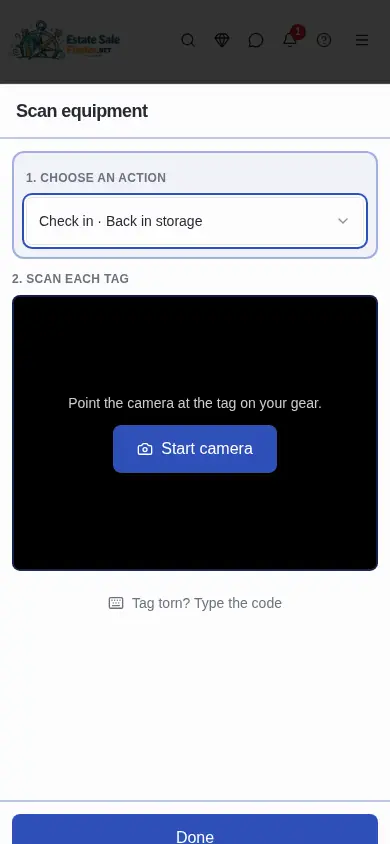
Choose the action once — check in, send to a sale, give to a teammate, move to a place, loan out, or mark for repair — then scan each tag continuously. The scanner provides sound and vibration feedback, keeps a running list, and includes Undo last. A damaged tag can be entered manually, and the phone torch is available when the device supports it.
This is intentionally similar to the register scanner: large controls, a fixed Done action, and no repeated destination setup between items.
Know exactly where one item is
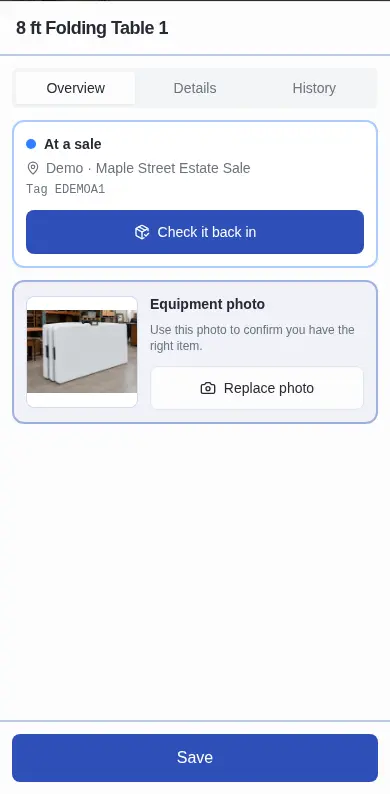
Open any piece to see its current status, exact destination, tag code, photo, and a one-tap Check it back in action. The Details tab stores:
- Name and customizable type
- Home location
- Purchase date and what it cost
- Serial number and condition
- Notes, photo, optional printed tag, and repair status
The History tab records check-outs and check-ins, including the sale or holder and who performed the movement. That creates accountability without asking the crew to write a separate report.
Sale cards and Sale Management stay synchronized
Equipment assigned to a sale appears in Equipment at Sale on that sale’s card and in the Sale Management load list. Add it from either place, scan it to the sale, remove it, or mark it loaded/returned; both views use the same equipment assignment so the company does not maintain two conflicting lists.
At the end of the sale, the remaining equipment list becomes a practical load-out checklist. Anything still assigned is visible before the team drives away.
Equipment Investment protects the profit picture
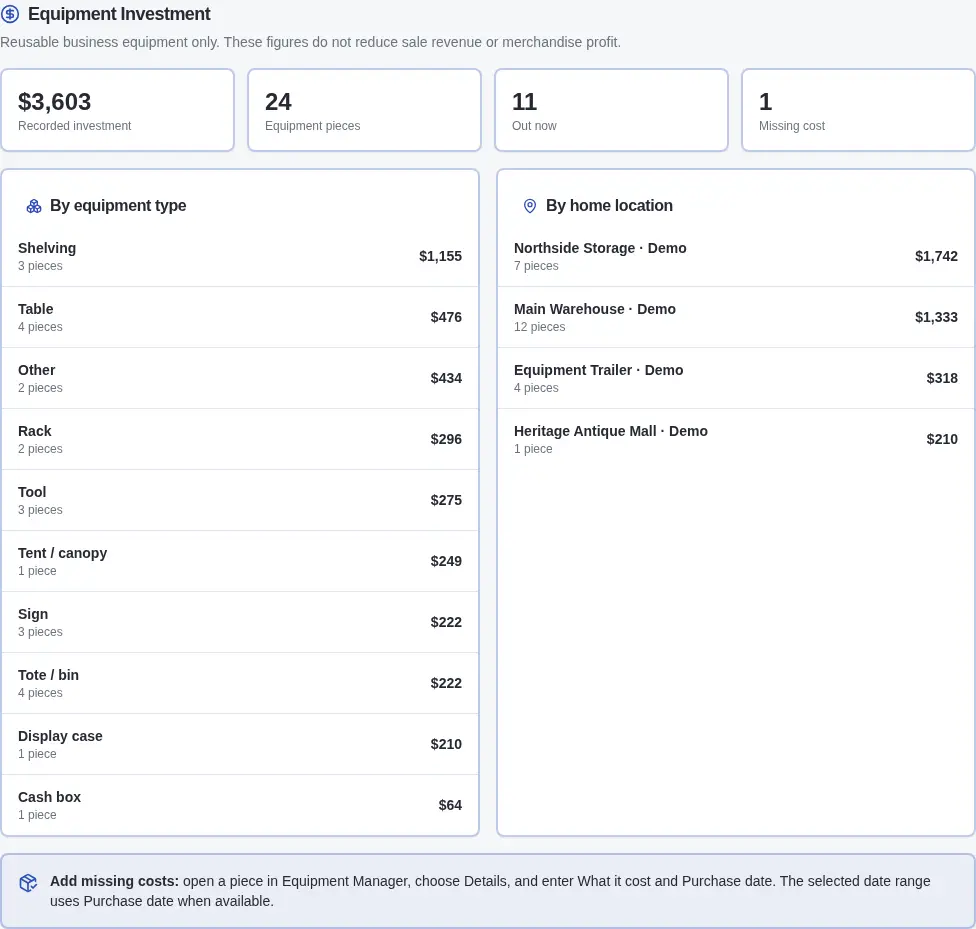
The Equipment Investment section in Analytics totals the reusable business equipment recorded in the account. It shows:
- Recorded investment from entered purchase costs
- Equipment pieces in the selected date range
- Out now count
- Missing cost reminders
- Investment by equipment type
- Investment by home location
The selected Analytics date range uses Purchase date when it exists and the date the record was added when it does not.
Important: reusable equipment is shown separately. It does not reduce sale revenue or merchandise profit, and EstateSaleFinder does not invent a per-sale equipment expense allocation. Booth Max members also retain their separate inventory-health, margin, category-performance, sell-through, days-to-sell, and aging-inventory reporting for merchandise.
A field system, not another office chore
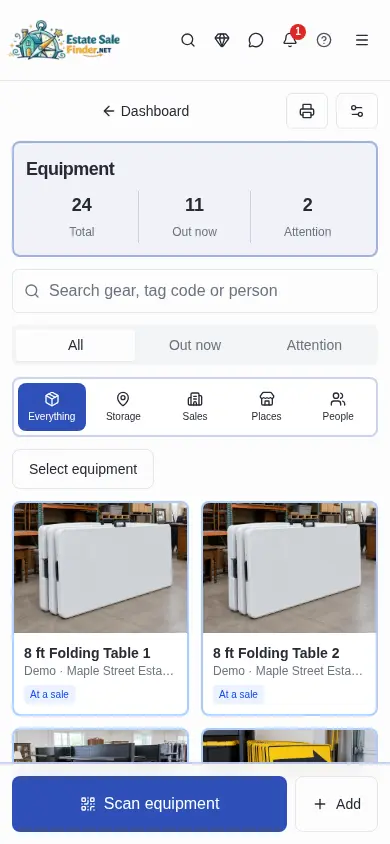
The phone experience puts the frequent actions under the thumb: Scan equipment and Add remain available at the bottom, lists load ten at a time, and move/add panels open as focused sheets instead of squeezing desktop forms onto a small screen.
The best equipment systems follow the same proven asset-management habits: identify each asset, standardize locations, record custody changes, preserve movement history, support bulk actions, and make the field action faster than skipping it. EstateSaleFinder applies those practices to estate sales, CRM clients, crews, booths, and markets instead of forcing an estate company into IT-department terminology.
Included free with Pro and Booth Max
Equipment Manager is included with EstateSaleFinder Pro ($99/month and higher) and Booth Max at no additional equipment-software charge. It connects to the sales, clients, teammates, selling places, and Analytics already in the account.
Our goal is straightforward: help you spend less time searching, replace less equipment, avoid rushed setup problems, understand where business money is invested, and maximize the profit you keep from every sale and selling location.
Start with the gear that hurts most when it disappears
- Open Equipment Manager from the dashboard or Settings.
- Add storage spaces, branches, booths, markets, and teammates.
- Start with tables, signs, shelving, racks, dollies, and checkout equipment.
- Add a photo and home location; enter cost details when known.
- Print QR tags if scanning helps the crew, or stay tag-free.
- Use bulk Move or Scan whenever equipment leaves or returns.
- Review Out now, Attention, People, Sales, Places, and Analytics → Equipment Investment.
See all EstateSaleFinder plans, explore software built for estate sale companies, or compare estate sale platforms. If your company already has Pro or your business uses Booth Max, Equipment Manager is ready inside your account.
Your sale merchandise gets photographed, priced, and tracked because it affects profit. The tables, shelving, signs, and tools that make every sale possible deserve the same protection.
Keep exploring
Protect the equipment that protects your profit
Equipment Manager is included with Pro and Booth Max at no additional charge.
See plans and features
About the author
Andy
Founder, EstateSaleFinder.net
Hi, I'm Andy — a retired commercial photographer turned developer with a five-year (and counting) obsession with estate sales. I started EstateSaleFinder.net because I knew there had to be an easier, smarter way to find and list estate sales. Now I get to chase treasure and build the tool I always wished existed.