

What Is a CRM? The Plain-English Guide for Estate Sale Companies (and Why You Already Need One)
If you've never heard the word "CRM" — or you've heard it and tuned out — this is for you. In plain English: what a CRM is, why estate sale companies lose real jobs without one, what they normally cost (it's a lot), and a complete walkthrough of every part of the EstateSaleFinder CRM — from the first lead to a booked sale to a thank-you note a year later. Including the Pre-Sale Walkthrough that tells you whether a sale is even worth taking. It's all built in, and it's part of Pro.
Let's start with the word itself, because it scares people off for no reason.
CRM stands for Customer Relationship Manager. That's it. Strip away the tech-speak and a CRM is simply a system that remembers every potential client for you and tells you what to do next. Who called, what they need, where they are in the process, and the one thing you should do today so the job doesn't slip away.
If you run an estate sale company and you keep your leads in a mix of text messages, a notebook by the phone, sticky notes on the monitor, and your own memory — congratulations, you already have a CRM. It's just a bad one, and it's quietly costing you jobs. Let's fix that.
What is a CRM, really? (No jargon)
Imagine a single screen that shows every homeowner who has ever reached out to you, lined up in order, each one tagged with exactly where they stand:
- The widow who called Tuesday and is waiting to hear back from you.
- The family whose walkthrough is scheduled for Saturday.
- The man you quoted last week who hasn't signed yet.
- The sale you booked that ends next month.
A CRM keeps all of that in one place, automatically, so nothing falls through the cracks. Instead of "I think someone called about a house in the north end?" you have a tidy list that says: call this person back, send this quote, follow up on that contract.
That's the whole idea. It's not complicated software for big corporations. For an estate sale company, it's the difference between chasing your business and running it.
Why estate sale companies lose jobs without one
Here's the hard truth most companies learn too late: in this business, the first company to respond usually wins the job. A grieving family or a downsizing senior reaches out to two or three companies. Whoever calls back first, sounds organized, and follows through gets the contract. The others never hear back and never know why.
When your leads live in scattered texts and your head, three things happen over and over:
- Leads go cold. Someone calls while you're running a sale. You mean to call back. Three days pass. They've already signed with someone else.
- You look disorganized. You call back and can't remember what they told you, so you ask again. To a family handling a parent's estate, that feels like you don't care.
- You leave money on the table. You forget to follow up on a quote, forget to ask for the review that wins your next five clients, and forget the past client who'd happily hire you again.
None of that is a hustle problem. It's a system problem. And a system problem has a system fix.
How much does a CRM cost? (Brace yourself)
This is where most estate sale owners check out — because standalone CRM software is genuinely expensive, and it's almost never built for what you actually do.
Here's what the major players charge, per user, per month, billed annually:
| CRM software | Typical entry price | Realistic working plan |
|---|---|---|
| Zoho CRM | ~$14 / user / mo | ~$23–$40 / user / mo |
| Pipedrive | ~$14 / user / mo | ~$24–$49 / user / mo |
| HubSpot | "Free" tier | ~$15–$90 / user / mo (jumps fast) |
| Salesforce | ~$25 / user / mo | ~$80–$165 / user / mo |
Now do the math for a real estate sale crew. Say you and three team members all need access — that's four "seats." On a mid-tier plan at, say, $40 per user, you're looking at $160 a month, every month, just for software. And you often pay setup or onboarding fees on top of that.
But the bigger problem isn't even the price. It's that every one of those tools is generic. They're built for software salespeople and real estate agents. None of them know what a walkthrough is. None of them help you decide whether a sale is worth taking. None of them generate an estate-sale contract or a client report. You'd spend weeks bending a generic tool into something that sort of fits — and still not have what you need.
The EstateSaleFinder CRM: built for estate sales, included in Pro
Here's the part that matters. EstateSaleFinder has a full CRM built specifically for estate sale companies — and it's included in the Pro plan ($99/mo). Not per user. Not per seat. Your whole team shares it.
No separate software. No integrations to wire up. No $160-a-month surprise. It lives right inside your dashboard, it understands estate sales because it was built for them, and it covers the entire journey — from the moment a lead arrives to a thank-you note a full year after the sale ends.
Let's walk through every piece of it, and why each part matters.
Where your leads come from
Before the pipeline can help you, leads have to land in it. Yours arrive three ways, all automatically — and every one ends up in the same place:

- Your public "Hire Us" form. Every company page on EstateSaleFinder has a built-in request form. When a homeowner finds you and reaches out, that inquiry drops straight into your CRM.
- The embeddable lead widget. You can paste a lead form onto your own website. Someone fills it out there, and it still flows into the same pipeline. One inbox for everything.
- Manual add. Got a call or a referral the old-fashioned way? Add the client in two taps so they're tracked like everyone else.
Why it matters
every lead, from every source, ends up in one organized place. No more "wait, did that come in by text or email?"
The pipeline: your whole business on one screen
The heart of the CRM is the pipeline — a board that moves each client left to right through the exact steps of winning a job. At a glance, you see how many leads sit in each stage, so you always know where your business stands and who needs attention today.
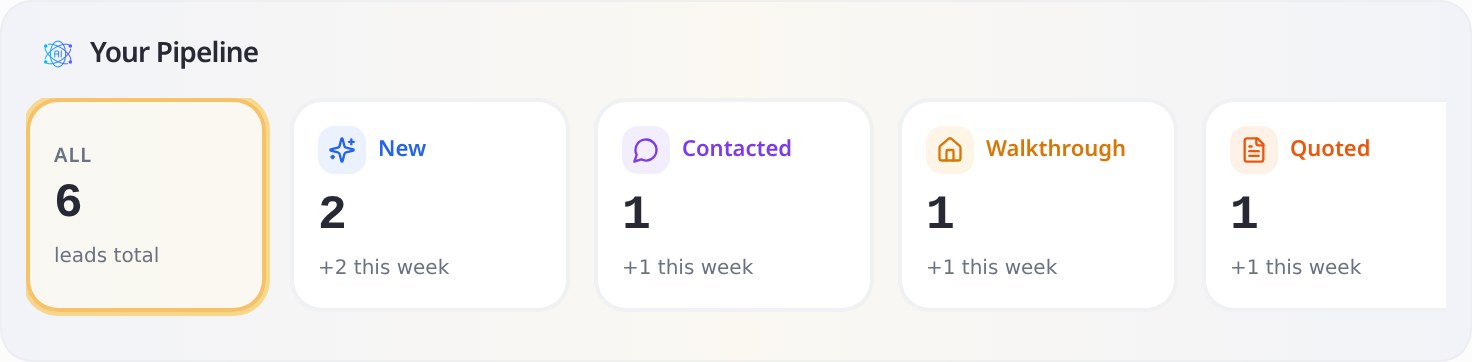
Every client moves through the same six stages, and each one tells you the exact next step to take:
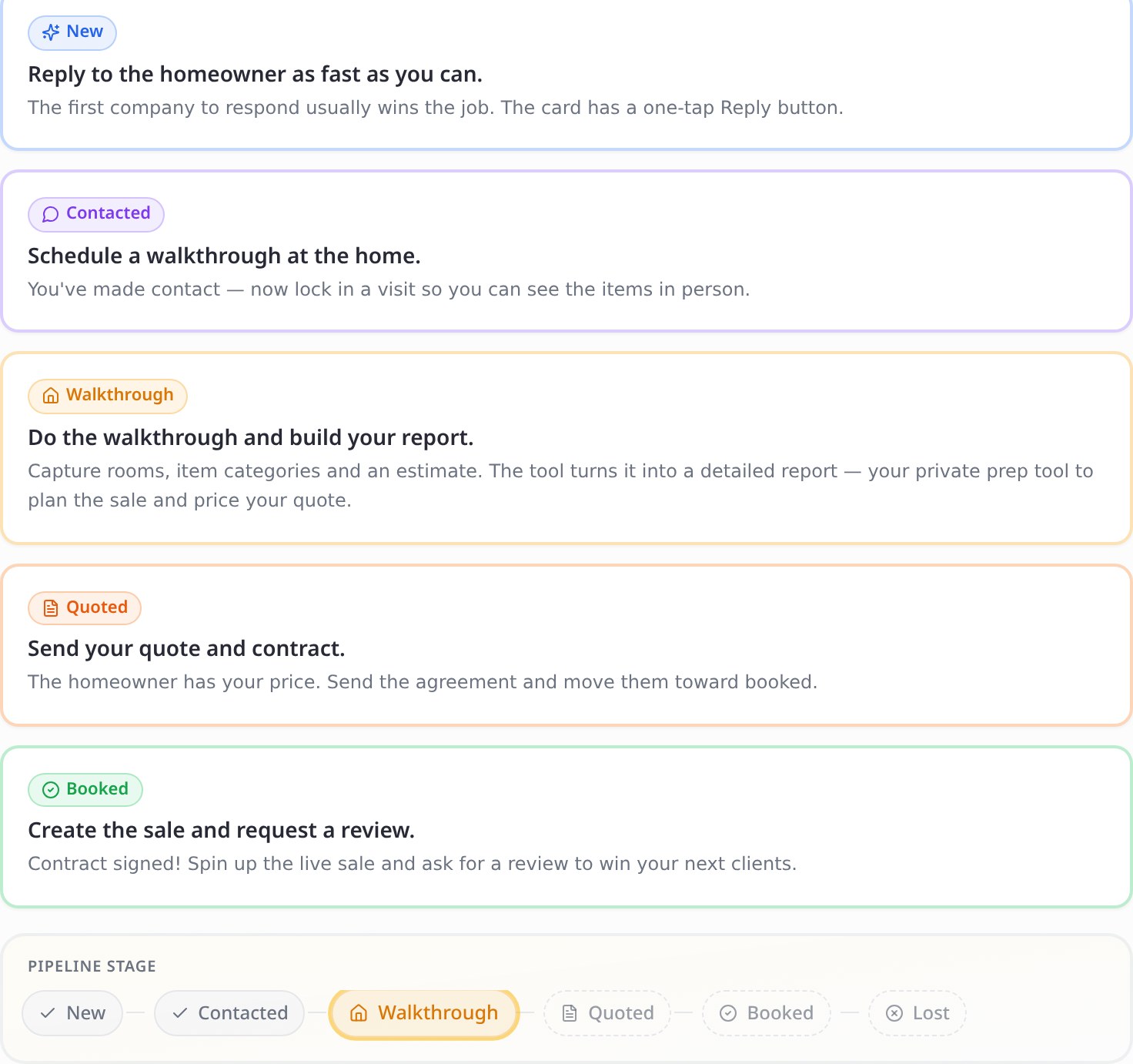
Here's what each stage means, and why it earns its place:
| Stage | What it means | Why it matters |
|---|---|---|
| New | A fresh inquiry just landed, with a one-tap reply button. | Your speed-to-lead moment. The first company to respond usually wins the job — so new leads are impossible to miss. |
| Contacted | You've replied; the ball is in their court. | Separates "I still need to reach out" from "I'm waiting to hear back," so you never ignore someone or pester them twice. |
| Walkthrough | A home visit is scheduled or done. | Where you find out what the sale actually is — and whether it's worth your time. The make-or-break step (full section below). |
| Quoted | Your price and terms are out the door. | Quotes are where deals quietly die. Every open quote stays visible, so you follow up at the exact moment jobs are won or lost. |
| Booked | The contract is signed. | Booked clients become your portfolio — spin up the live sale, then ask for the review that wins your next clients. |
| Lost | The job didn't happen, and you record why. | A lost lead is data. Over time, your "Lost" reasons reveal if you're priced wrong, too slow, or losing to one competitor — so you can fix it. |
And it's not just a list of names — each client card shows the stage, the property, your estimate, and the one action that moves the job forward. Here are three clients flowing from walkthrough to booked:
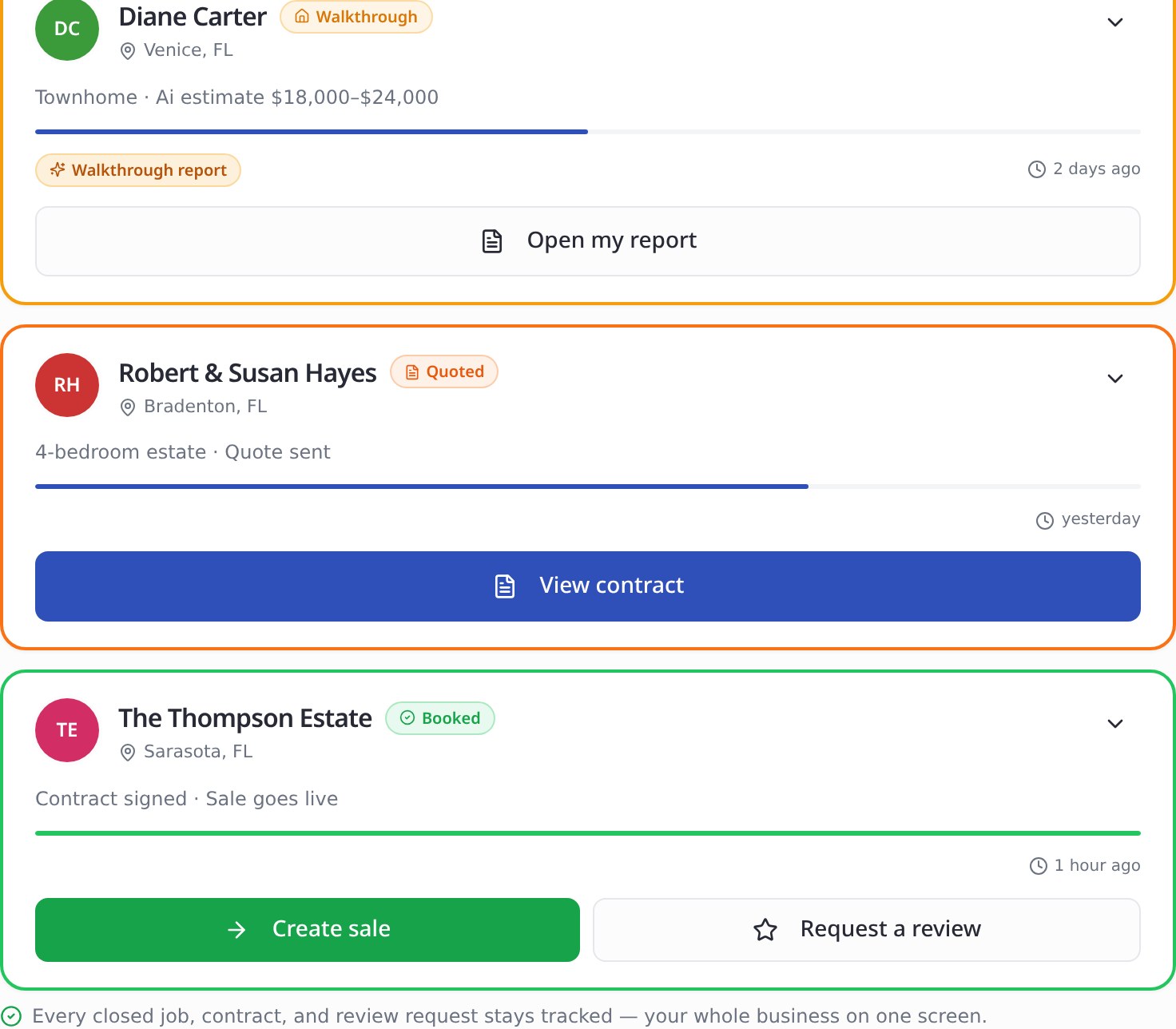
Why the pipeline matters
it answers the only question that runs an estate sale business — who do I need to act on today? Nothing sits forgotten, and nothing slips through the cracks.
The Pre-Sale Walkthrough: the tool that tells you if a sale is even worth it
If you read one section, read this one. The Pre-Sale Walkthrough is the single most valuable part of the CRM, and it's something no generic software on earth will give you.

When you visit a home, you open a guided walkthrough on your phone or tablet and work through a structured set of sections — the same things a seasoned pro checks, so nothing gets forgotten under pressure:
- Client & property basics — who, where, why they're selling, deadlines, access dates.
- Rooms present and item categories present — what you're actually working with.
- High-value item flags — jewelry, firearms, art, vehicles, anything that needs special handling or an appraiser.
- Workload & difficulty — volume of items, garage contents, furniture difficulty, stairs and layout.
- Access, occupancy & people — is the home occupied, are pets present, who's involved in decisions.
- Condition & hazards, safety & logistics — cleanliness, parking, gated community, anything that affects your crew.
- Scheduling & staffing, plus sale preferences and private notes.
Here's the magic: as you fill it in, the walkthrough turns your answers into a clean, detailed report — your private prep tool. And that report does the one thing every estate sale owner desperately needs:
It helps you decide whether the sale is worth taking.
Not every house is a good job. A home stuffed with low-value clutter, three flights of stairs, a tight deadline, and a hard-to-reach location can cost you money even if it sounds exciting on the phone. The walkthrough lays the workload, the access challenges, the high-value finds, and the realistic payout side by side, so you can make a clear-eyed call: take it, pass on it, or quote it higher. You stop saying yes to sales that drain your crew and start saying yes to the ones that actually pay.
And when you do take it, that same walkthrough data flows straight into your quote — so you're pricing from real information, not a guess.
Why it matters
the fastest way to grow an estate sale business isn't more sales — it's better sales. The walkthrough is how you tell the difference before you've committed a single day of labor.
The Sale Playbook: nothing falls through the cracks
Once you've booked a sale, the same walkthrough you did turns into a Sale Playbook — a working to-do list built from the home's actual details, plus a full recap of everything you captured. Your whole team sees it, so everyone knows what needs doing before the doors open.
Why it matters
a smooth, well-run sale is your best advertising. The Playbook makes sure the staging, pricing prep, and logistics you noted on the walkthrough actually happen.
Contracts, quotes & client reports
The CRM handles the paperwork that usually eats your evenings:
- Send quotes to the homeowner right from their card.
- E-sign contracts — send the agreement, the client signs digitally, and it's stored with their record. No printing, scanning, or chasing signatures.
- Client-facing PDF reports — generate a polished, branded walkthrough report you can share with the homeowner to win their trust.

Why it matters
professional paperwork, delivered fast, is what makes a family choose you over the company still mailing PDFs. It also protects you — everything is in writing and tied to the client.
Tasks, reminders, notes & contact history
Every client card carries its own memory:
- Lead notes — jot down what you discussed so you're never starting from scratch.
- Tasks & reminders — "call back Thursday," "send revised quote," "follow up on contract." The system nudges you so you don't have to hold it all in your head.
- Contact history — a running log of every call, message, and email, with a "last contacted" line so you always know when you last reached out.
Why it matters
this is the difference between sounding like you forgot they exist and sounding like they're your only client. Follow-through is what closes estate sale jobs.
Scheduling & appointments
Book walkthroughs and appointments right inside the CRM, tied to the client, so visits never get double-booked or forgotten.
Why it matters
a missed or mixed-up walkthrough is a lost job. Keeping scheduling in the same place as the client keeps everyone aligned.
Stay in Touch: the 1-year follow-up that brings clients back
Estate sales are a word-of-mouth business. The CRM includes a Stay in Touch feature that automatically surfaces past clients as their one-year mark approaches — a gentle reminder to send a warm, branded note letting them know you're thinking of them and appreciate their business.
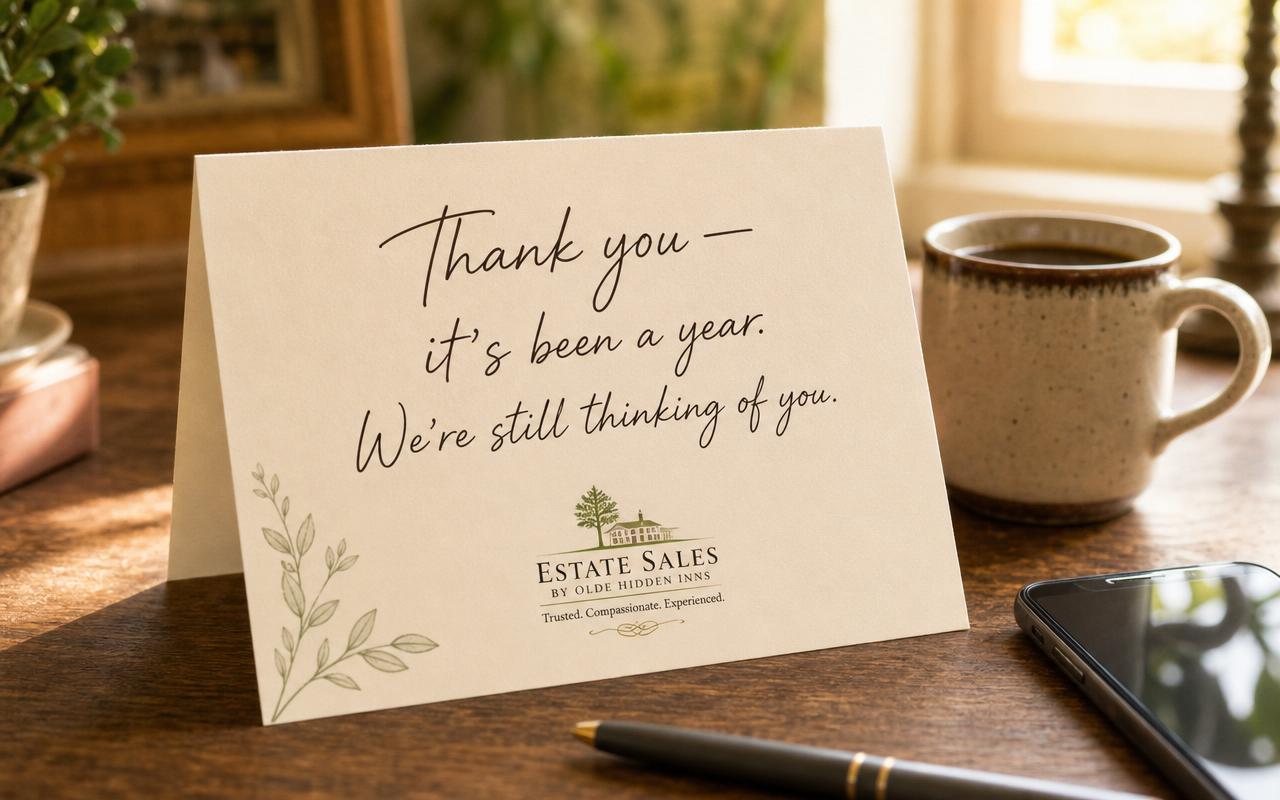
You pick from editable templates (all branded with your company name and logo), tweak the message, and send — you stay in full control; nothing goes out without your approval.
Why it matters
a past client who feels remembered refers you to their friends, their neighbors, and their family. One thoughtful note a year can generate more business than any ad — and the CRM makes sure you never forget to send it.
A pipeline that bends to how you work — and a team that stays in sync
Every company runs a little differently, so the pipeline is customizable. You can rename stages, turn walkthrough sections on or off, and toggle the CRM features you use — all from one settings screen. And because it's team-shared, every member of your account sees the same up-to-date pipeline, so the left hand always knows what the right hand is doing.
Why it matters
the tool fits your process instead of forcing you into someone else's, and nothing gets lost when a job passes between team members.
Bonus: let the Ai Assistant do the busywork
On the Pro+ plan, the built-in Ai Assistant can run parts of your CRM by chat — create reminders, log a note on a lead, update a client's stage, and pull up your active leads — all by just asking. It's like having an assistant who keeps your pipeline tidy while you're out running sales.
Why "built-in" is the whole point
Step back and look at what you'd otherwise be juggling: a generic CRM ($100+/month), a separate e-signature tool, a scheduling app, an email tool for follow-ups, and a spreadsheet to track it all — none of which understand estate sales.
EstateSaleFinder folds all of that into one system, built for your industry, that you already get with Pro:
- One inbox for every lead, from every source.
- A pipeline that shows you what to do today.
- A walkthrough that tells you whether a sale is worth taking — and prices it for you.
- Contracts, quotes, reports, tasks, reminders, and scheduling in one place.
- Past clients who come back, because you remembered them.
You own your client list — it's yours, exportable, and not held hostage by another platform. And it costs you nothing extra on top of Pro.
The bottom line
A CRM isn't fancy corporate software. It's just the thing that makes sure no lead, no follow-up, and no past client ever slips through the cracks — and that you only take the sales actually worth your time. For an estate sale company, that's not a nice-to-have. That's the business.
The standalone tools cost a fortune and weren't built for you. Yours was — and it's already part of your Pro plan. Open your Clients dashboard, do your next walkthrough inside it, and feel the difference on your very next lead.
Ready to run your business instead of chasing it? See everything in Estate Sale Pro.
Keep exploring
Ready to start your own treasure hunt?
Discover estate sales near you and find incredible deals.
Explore Sales Near Me
About the author
Andy
Founder, EstateSaleFinder.net
Hi, I'm Andy — a retired commercial photographer turned developer with a five-year (and counting) obsession with estate sales. I started EstateSaleFinder.net because I knew there had to be an easier, smarter way to find and list estate sales. Now I get to chase treasure and build the tool I always wished existed.