
The Sale Marketing Report: Your Estate Sale's Built-In Marketing Team
Most estate sale companies post a sale and quietly hope the right people show up. The Sale Marketing Report ends the guesswork. It reads every item in your sale and hands you a ready-to-run marketing playbook — your star items, the exact trends your inventory matches, the precise Facebook groups and subreddits to post in, and one-tap social posts. Here's a full tour of every feature, using a real report.
Ask almost any estate sale company what keeps them up at night and you'll hear a version of the same two sentences: "Not enough people showed up." And the quieter, more painful one: "The people who did show up weren't the right people for what I had."
You can have a house full of genuinely great inventory — mid-century furniture, sterling, real art, collectible glass — and still watch it sit, because the forty regulars who come to every sale in town simply aren't the buyers for those pieces. The right buyer for your Danish credenza exists. They just never knew your sale was happening.
For decades the entire playbook has been: post the sale, and hope. Hope the algorithm shows it to someone. Hope a collector happens to scroll past. Hope the weather's good and the right person is free on Saturday. That's not a marketing strategy. That's a coin flip you run every single weekend.
The Sale Marketing Report was built to end the hoping. It's a feature inside EstateSaleFinder that reads every item in your sale and then hands you a complete, personalized marketing plan — who your best buyers are, where they're hanging out online, what they're searching for right now, and exactly what to post to reach them. No marketing degree required. It quite literally spoon-feeds you the work.
Let me walk you through the whole thing, using a real report from a live sale.
Finding it takes one tap. Open your dashboard, find the sale you want to promote, and look for the Sale Marketing Report button right on the sale card — sitting next to your Ledger.
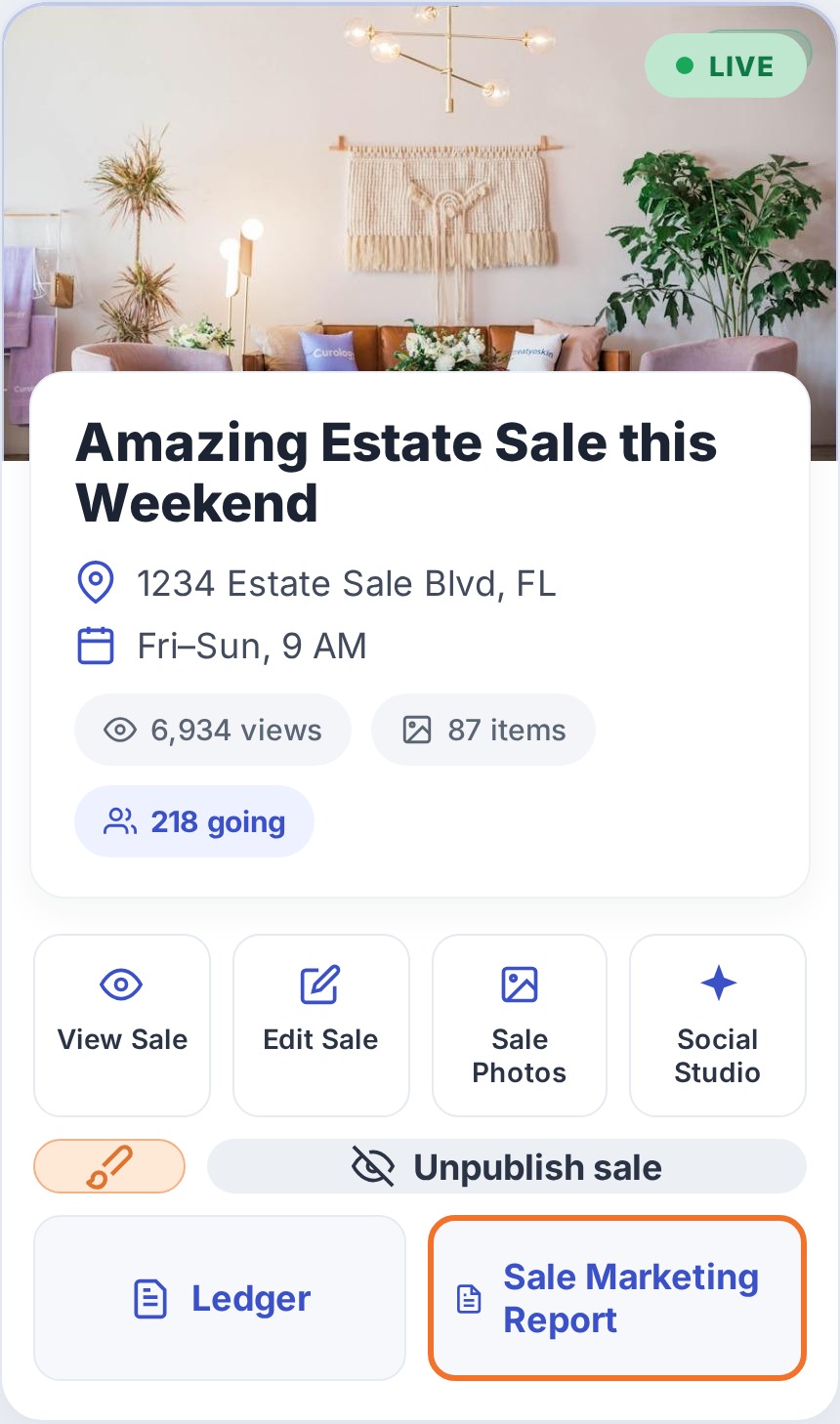
That one button is the entire philosophy of the feature: your sale already has the power to reach the right people. Most companies just never had the tools to use it. This report is those tools.
We're not a listing site. We're your growth team.
Before the tour, it's worth saying plainly what this feature represents. Plenty of sites will take your sale, slap it on a directory, and call it a day. You're one address in a long list, competing for the same tired audience as everyone else.
That's not what this is. The Sale Marketing Report exists because we think our job doesn't end when your listing goes live — it starts there. We want your company to grow. We want you reaching followers and buyers you never expected to find, and frankly never knew how to find. The report is us doing that homework for you, sale after sale, so every event you run reaches further than the last.
A 60-second tour: the Top Recommendations
When you open a sale's report, the first thing you see is Top Recommendations — the highest-value moves for this specific sale, ranked. Think of it as the report reading itself and telling you, "If you only do four things this week, do these."
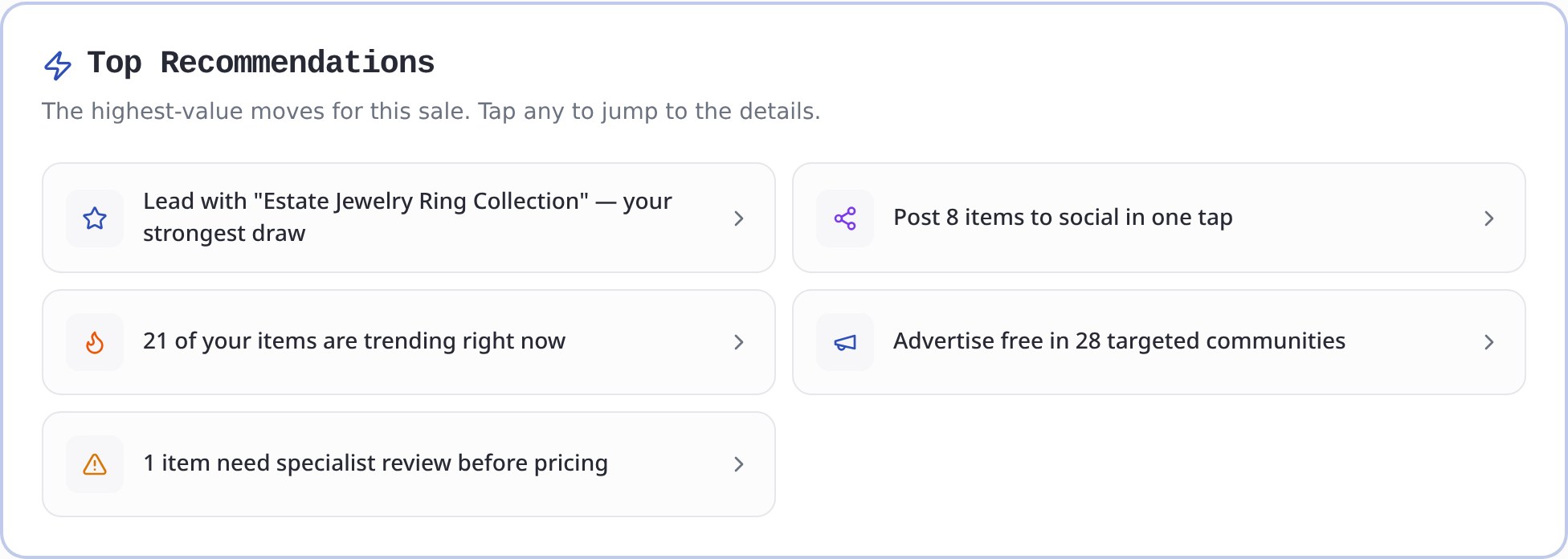
Every card is tappable and jumps you straight to the details. Notice how concrete these are:
- "Lead with your strongest draw" — it has already identified your single most marketable item.
- "Post 8 items to social in one tap" — the social posts are pre-built and waiting.
- "21 of your items are trending right now" — it cross-referenced your inventory against live buyer trends.
- "Advertise free in 28 targeted communities" — it found the exact free places to post.
- "1 item needs specialist review before pricing" — it even flags pieces where you might be leaving money on the table.
No blank page. No "where do I even start." You start at the top and work down.
Star Items — the pieces to lead with
Scroll down and you hit Your Star Items — Lead With These. This is the report picking out the most marketable items in your entire sale and telling you to build your advertising around them.
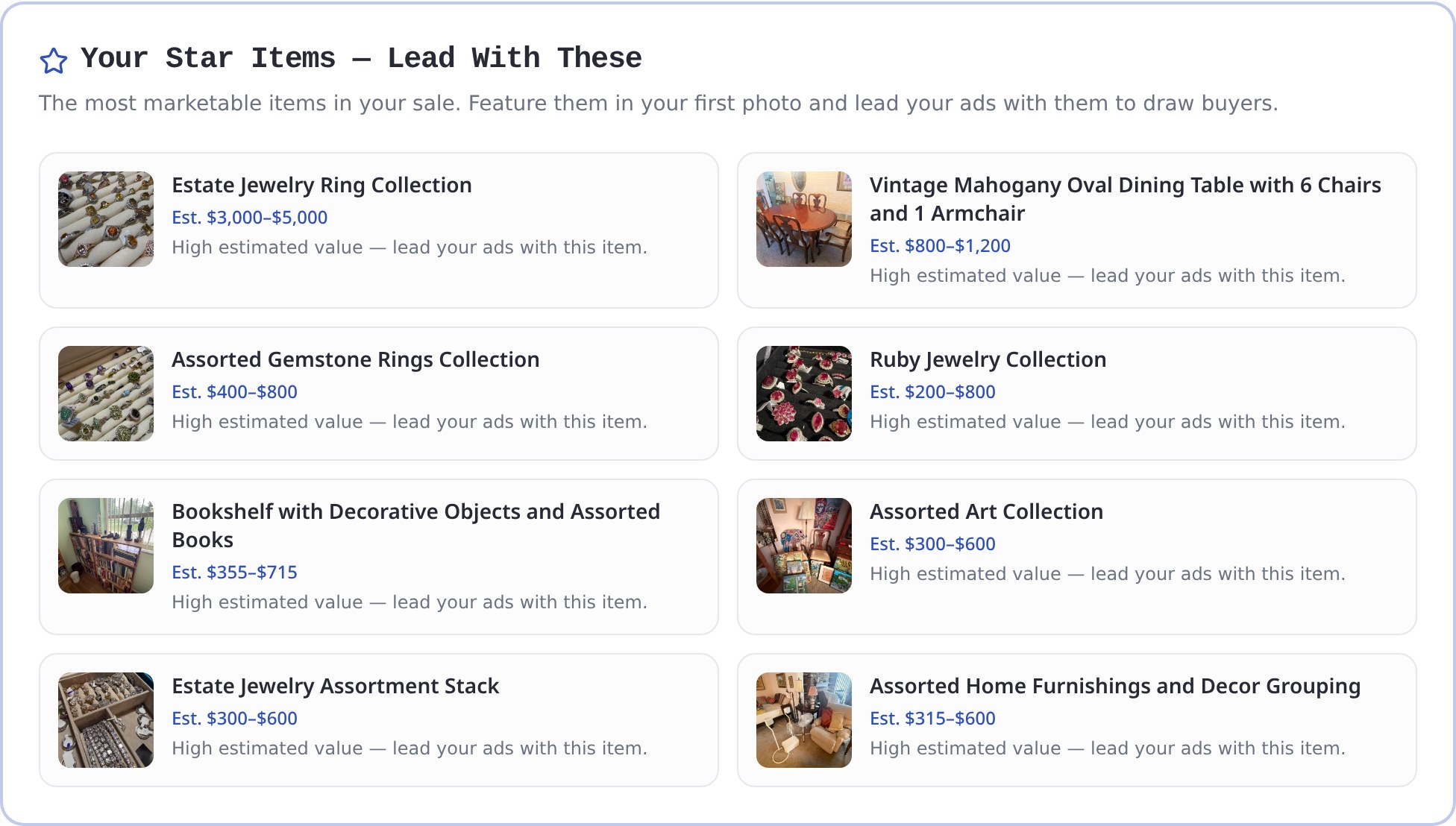
Why this matters: shoppers decide whether to come to your sale in about two seconds, based on your first photo and your headline. If you lead with a box of mismatched mugs, that's the sale people think you're running. Lead with the $3,000–$5,000 jewelry collection or the solid mahogany dining set, and you've told every scroller this is a serious sale worth driving for.
Each star item shows a real photo and an estimated value range, so you know exactly which pieces to feature in your cover photo, your headline, and the first images buyers see. You're no longer guessing what your "draw" is — the report already ranked it.
Recommended to Post on Social — one tap into the Studio
Here's where the "spoon-feeding" really kicks in. The Recommended to Post on Social section hand-picks the items worth posting, pre-selects them, and lets you drop straight into the AI Social Media Studio with everything ready to go.
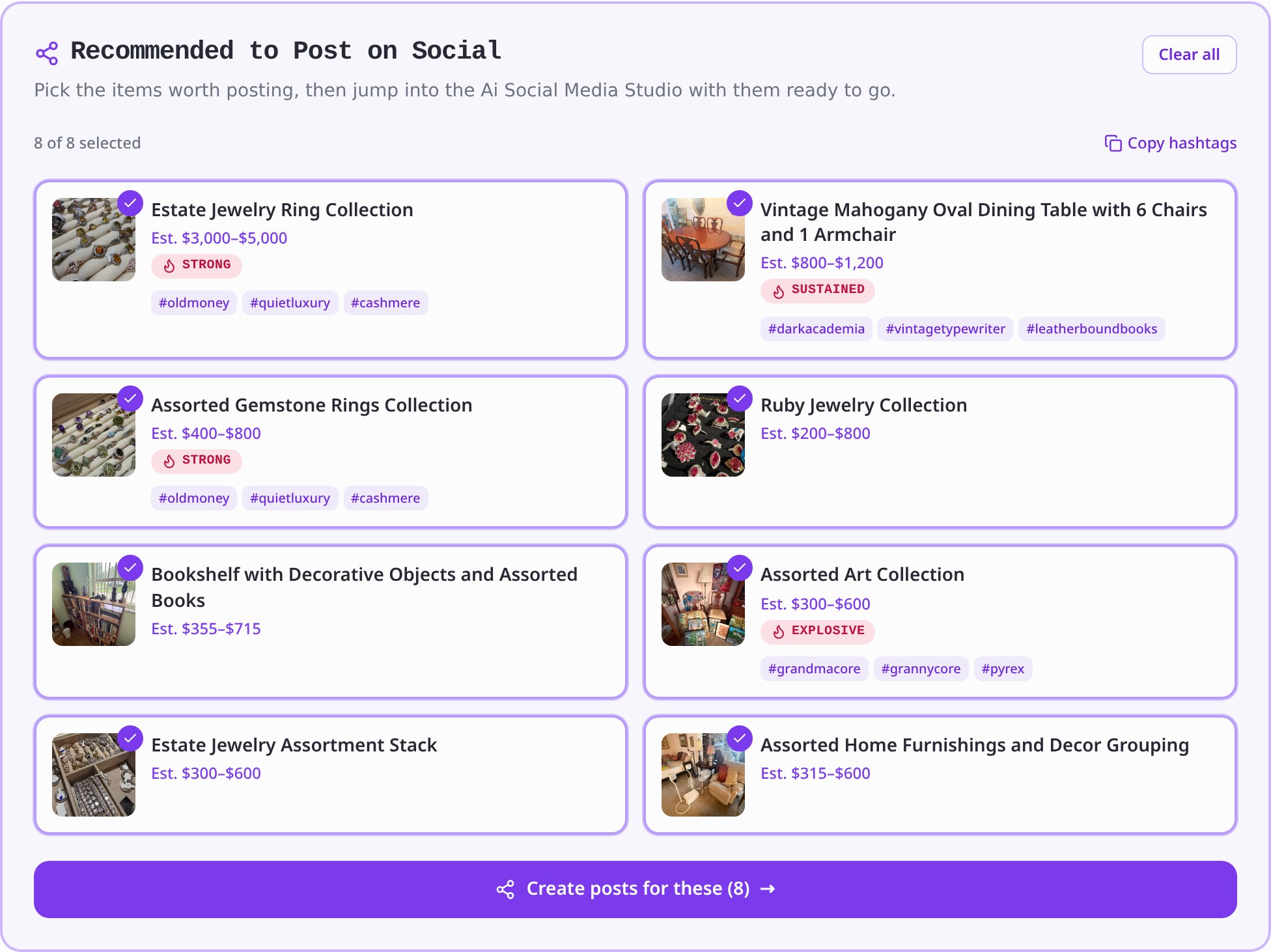
Look at the detail packed into each card:
- A demand signal on each item — Strong, Sustained, Explosive — so you know which pieces have the most heat behind them.
- Ready-made hashtags matched to the item (#oldmoney, #quietluxury, #grandmacore, #pyrex), so your posts land in front of the people already following those aesthetics.
- A "Copy hashtags" button and a big "Create posts for these" button that carries your selections right into the Social Media Studio.
This is the difference between "I know I should be posting on social" and actually having eight finished, on-trend posts ready before your coffee gets cold. The report doesn't just tell you to market — it does the heavy lifting and hands you the result.
Trending Right Now — matching your stuff to what buyers are chasing
This is the section that genuinely surprises people, and it's the heart of the "reach buyers you never knew how to reach" promise. Trending Right Now takes the items already sitting in your sale and matches them to the aesthetics and trends buyers are actively chasing — then tells you exactly how to ride each wave.
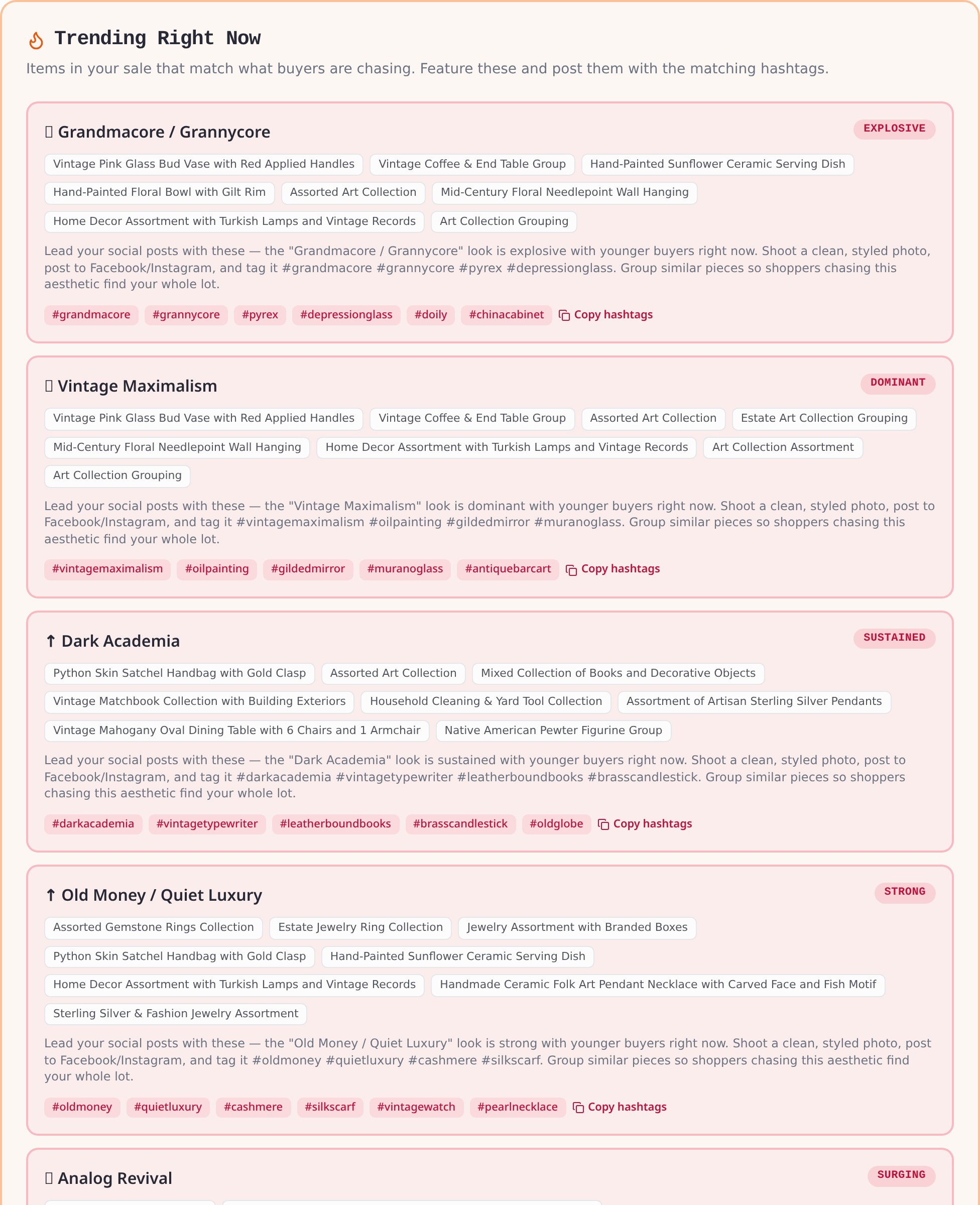
Read what it's actually doing here. It found that your sale contains items that fit Grandmacore (flagged Explosive), Vintage Maximalism (Dominant), Dark Academia, and Old Money / Quiet Luxury — and for each trend it:
- Lists the specific items in your sale that match that look, grouped together.
- Tells you what to do — "Shoot a clean, styled photo, post to Facebook/Instagram, and tag it #grandmacore #grannycore #pyrex #depressionglass. Group similar pieces so shoppers chasing this aesthetic find your whole lot."
- Hands you the exact hashtags with a one-tap copy button.
This is how you reach the buyer who wasn't coming to estate sales. A 28-year-old who follows #grandmacore on TikTok has probably never been to your sale — but they will absolutely drive across town for a Pyrex set and a gilded mirror if your post lands in their feed with the right tags. The report connects the dots between what you already have and who's already looking for it. You don't have to know what Grandmacore is. The report does.
Where to Advertise This Sale — the exact rooms your buyers are already in
If "Trending" tells you what to post, Where to Advertise This Sale tells you exactly where to post it — down to the specific group and community, all matched to your location and your inventory.
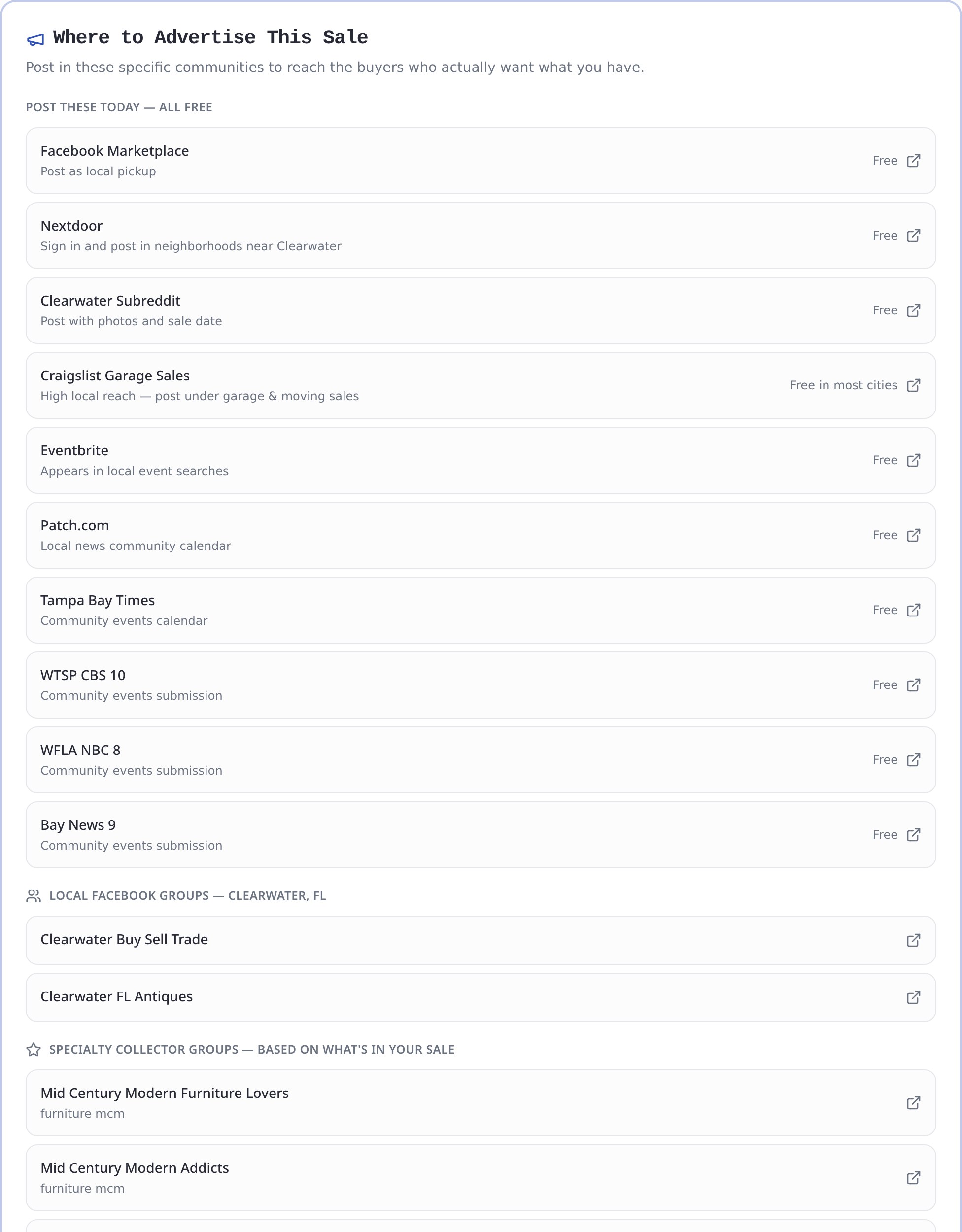
This single section replaces hours of research. It gives you:
- Free local channels to post today — Facebook Marketplace, Nextdoor, your city's subreddit, Craigslist garage sales, Eventbrite, Patch.com, and even local TV station community calendars (WTSP, WFLA, Bay News 9). All free, all clickable.
- Local Facebook groups for your specific city ("Clearwater Buy Sell Trade," "Clearwater FL Antiques").
- Specialty collector groups matched to your inventory — because your sale had mid-century furniture, it surfaced "Mid Century Modern Furniture Lovers" and "MCM Furniture Buy Sell Trade." Because it had coins, "Coin Collectors Buy Sell Trade." These are the rooms full of people who only want what you're selling.
Scroll further and the report also lists relevant subreddits (r/Mid_Century, r/Coins, r/ArtCollecting) and even auction houses for any high-value items worth consigning if they don't sell. It's a complete distribution map, custom-built for one sale.
How this fits the bigger picture: searchable items, wishlists, and you
The Sale Marketing Report doesn't work alone. It's the front door to the way EstateSaleFinder is fundamentally different from a plain directory:
- Every item you list is individually searchable, so a collector hunting "Roseville pottery" or a designer searching "marble console" finds your piece — even if they never heard of your company. Browse the live estate sale feed to see it in action.
- Buyers set wishlist alerts for the exact items they want, and get notified the moment a match goes live nearby. The report's trend matches feed directly into this pool of waiting, high-intent buyers.
- And the report turns all of that reach into a checklist you can actually follow.
Put together, you stop running the weekly coin flip. Instead of posting your sale and praying, you're publishing it to the precise people — local regulars and the trend-chasers, collectors, and designers who never knew estate sales were for them.
The bottom line
The Sale Marketing Report is, honestly, one of the most powerful things we've built — because it takes the single hardest part of this business (marketing to the right people) and does it for you, sale after sale:
- It finds your star items so you lead with your strongest draw.
- It builds your social posts and hands them to you ready to publish.
- It matches your inventory to live trends so you reach buyers chasing exactly what you have.
- It maps out every free place to advertise, down to the specific group and subreddit.
You bring the great inventory. We'll hand you the playbook for getting the right people in the door. That's the whole point — we're not here to be one more place you get lost in a list. We're here to help your company grow.
Ready to see your own report? List your sale on EstateSaleFinder, add your items, and let the Sale Marketing Report show you exactly who to reach and how.
Keep exploring
Ready to start your own treasure hunt?
Discover estate sales near you and find incredible deals.
Explore Sales Near Me
About the author
Andy
Founder, EstateSaleFinder.net
Hi, I'm Andy — a retired commercial photographer turned developer with a five-year (and counting) obsession with estate sales. I started EstateSaleFinder.net because I knew there had to be an easier, smarter way to find and list estate sales. Now I get to chase treasure and build the tool I always wished existed.