

How to Get More Google Reviews for Your Estate Sale Company (and Answer the Bad Ones) Without Breaking the FTC Rule
When to ask (after the final check), a copy-ready text, a dos-and-don'ts table from the FTC rule and Google policy, five reply templates for bad reviews, and how to report fake ones.
To get more Google reviews for your estate sale company, ask every client the same way. Send the request a few days after their final check clears, with your direct Google review link or QR code. Never offer a discount or gift for a review, and don't ask only the happy clients. Answer each bad review once: stay calm, state the facts, and offer to talk privately.
Quick summary
- Ask everyone, the same way. Google doesn't allow businesses to "selectively solicit positive reviews from customers" (Google).
- No rewards, ever. Google prohibits incentives "such as payment, discounts, free goods and/or services" for posting a review or removing a negative one.
- It's federal law, too. The FTC's Consumer Review Rule (16 CFR Part 465) took full effect on October 21, 2024. It bans fake reviews, buying positive or negative reviews, undisclosed insider reviews and suppressing negative reviews (FTC warning letter).
- The penalty is real. In December 2025 the FTC warned ten companies that violations can bring "civil penalties of up to $53,088 per violation" (Kelley Drye).
- Use Google's own link. Your Business Profile can create a review link and QR code for receipts and thank-you emails (Google Business Profile Help).
- Reply once, then take it offline. You're writing for the next family who reads it, not to win the argument.
Why do Google reviews decide who gets hired?
Families usually hire an estate sale company once, during a hard time, and they don't know what "good" looks like. So they search the company's name plus "reviews." Your reviews show up next to your Business Profile in Google Maps and Search (Google). A family comparing three companies will read the 1-star reviews first, and they'll also read how you answered them.
Google also notes that "a mix of positive and negative feedback often feels more trustworthy." A perfect 5.0 from eight reviews can look less convincing than a 4.8 from 120 reviews with calm replies.
Reviews from families vs. reviews from shoppers
You get two kinds of reviews, and they do different jobs:
- Client families (the people who hired you): these win you your next contract. They talk about communication, honesty, the cleanout and the final check.
- Shoppers (the people who bought at your sales): these show you run a well-organized sale. They also bring the early-bird line complaints and "prices too high" reviews.
Ask both groups. Just ask them at different times and in different ways. Shoppers can scan a QR sign at checkout, because Google suggests you can "print and display the QR code in your store" (Google). But don't stand over anyone. Google says businesses "should not require or pressure users to leave ratings or write reviews while on the premises" (Google).
When should you ask for a review?
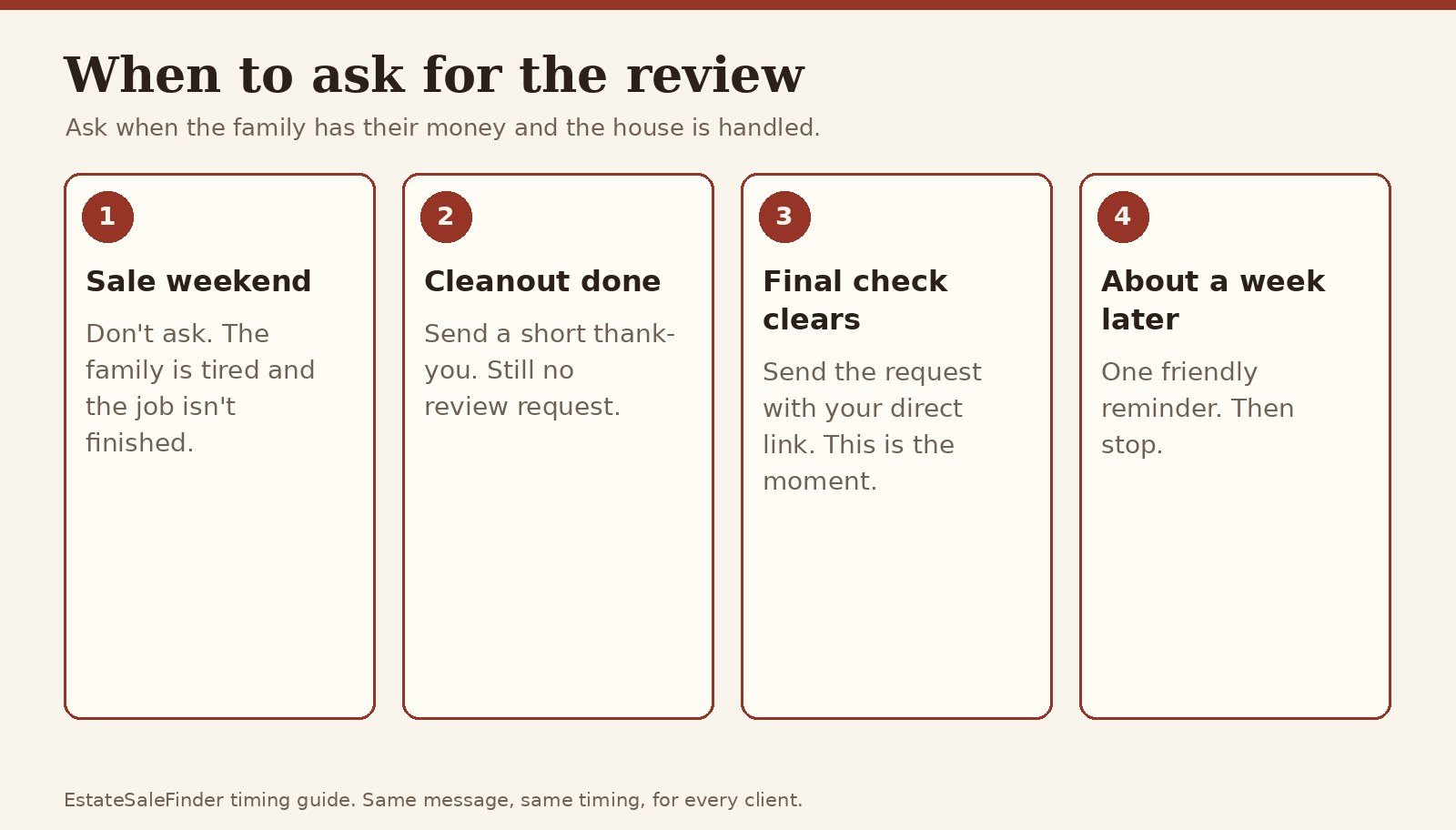
Ask after the final check clears, not during the sale. Before that, the family is tired, the house isn't empty and they haven't seen the numbers yet. Once the money is in their account and the house is handled, they can judge the whole job. That's also when they're most grateful.
- Sale weekend: don't ask.
- Cleanout done: send a short thank-you note. Still don't ask.
- Final check clears: send the review request with your direct link.
- About a week later: send one friendly reminder, then stop.
Use the same timing for every client, including the ones who complained. That's what "not selective" means in practice.
How to ask for a Google review

Get your link first. In your Google Business Profile, select Read reviews, then Get more reviews, and copy the link or save the QR code. Google notes the QR code can only be made on a computer browser, not a phone (Google).
Then use it everywhere:
- On the final statement. Put the QR code with one line: "If you have a minute, we'd be grateful for an honest review."
- By text, the day the check clears. Most families answer a text faster than an email.
- In your thank-you email. Google lists receipts and thank-you emails as good places for the link.
- Through referral partners. Realtors, elder-law attorneys and senior move managers who send you work can share your profile with families they refer. They should never write reviews themselves.
Copy-ready text message:
Hi [First name], it's [Your name] from [Company]. Your final check has cleared, and I wanted to say thank you for trusting us with your mom's home. If you have a minute, an honest Google review helps other families find us: [link]. Either way, it was an honor to help.
Notice what it doesn't say: "5 stars," "positive," or any reward. Google doesn't allow you to "request that specific content be included" (Google).
On EstateSaleFinder
when a client job reaches the closeout stage in Clients, the Request a review button emails the family a branded review request from your company. See how the client tools work.
Can I offer a discount for a review?
No. Google prohibits offering "payment, discounts, free goods and/or services" in exchange for posting a review, and also for changing or removing a negative one (Google). The FTC rule separately bans incentives "conditioned on the writing of consumer reviews expressing a particular sentiment," such as "gift cards or discounts only for 5-star reviews" (FTC). For Google reviews, skip rewards entirely. That includes a "small commission break" or "a free consult for a friend."
Google review dos and don'ts for estate sale companies
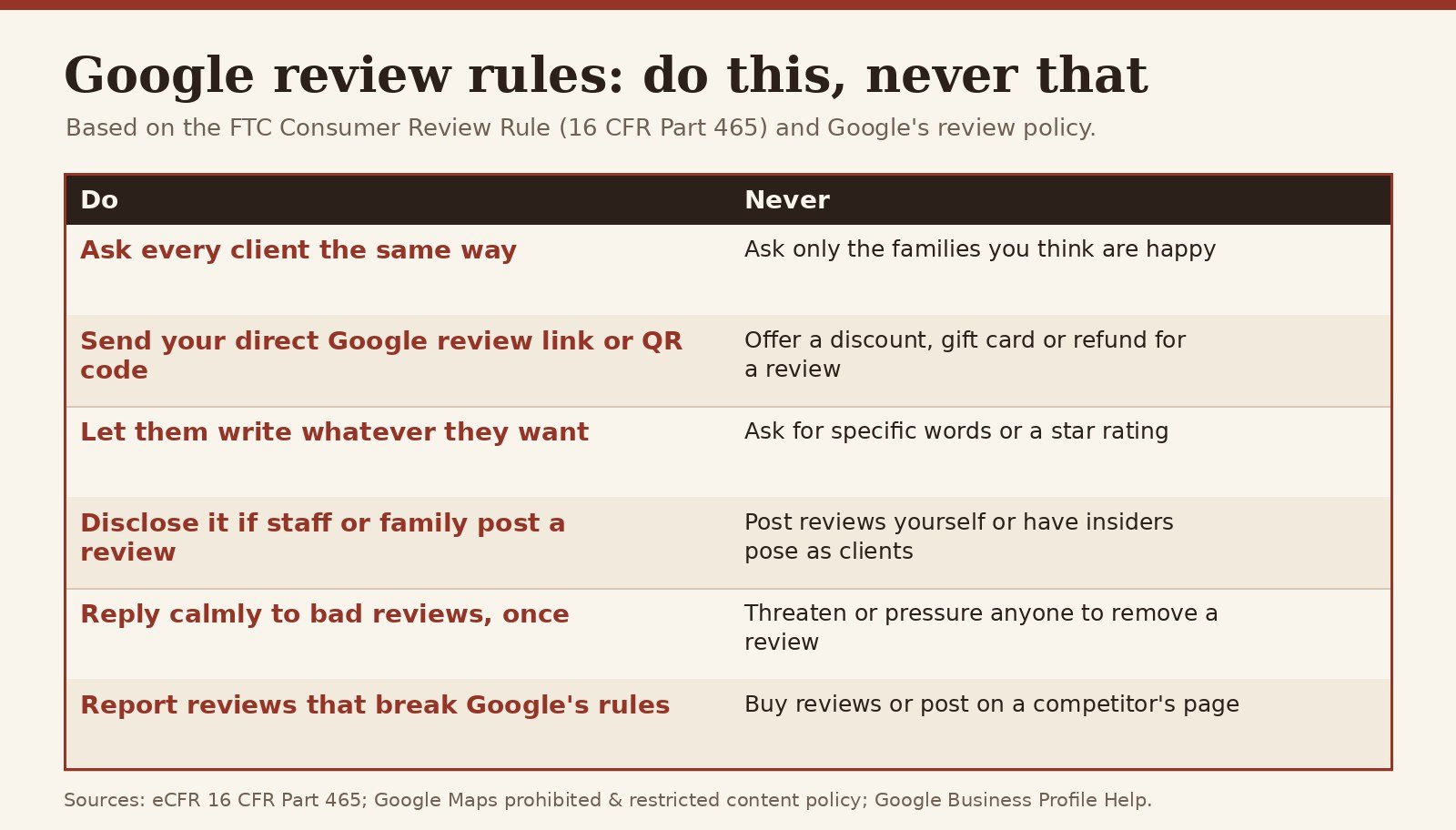
The table below is based on the FTC rule text (eCFR), the FTC's warning letter and Google's prohibited content policy.
| Do | Never |
|---|---|
| Ask every client the same way, at the same point | Ask only the families you think are happy |
| Share your direct Google review link or QR code | Offer a discount, gift card, refund or freebie for a review |
| Let them write whatever they want | Ask for specific words or a star rating |
| Disclose it clearly if staff or relatives post a review | Have insiders post reviews posing as clients |
| Reply calmly to bad reviews, once | Threaten, pressure or pay anyone to remove a review |
| Report reviews that break Google's rules | Buy reviews, or post on a competitor's page |
Also check your contract. The FTC rule targets review suppression, and the FTC has warned companies that use contract terms that might stop customers from posting honest reviews or penalize them for doing so (Greenberg Traurig). Remove any "no negative reviews" clause. Our estate sale contract checklist covers what should be in there instead.
This is general information, not legal advice.
How to respond to a bad Google review
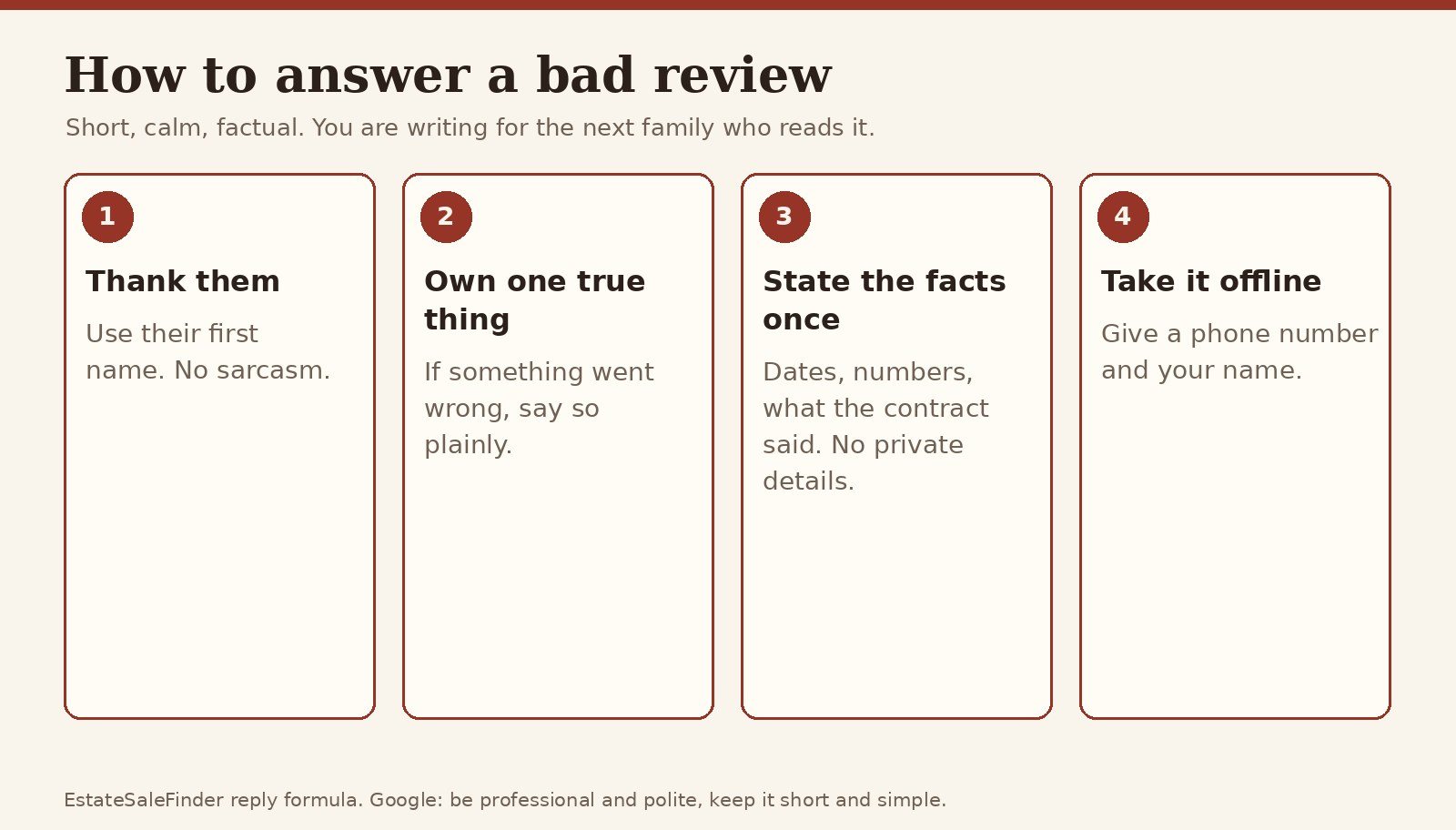
Google's own advice for replies: "be professional and polite" and "keep it short and simple" (Google). Your reply is public, it appears as your business, and the reviewer is notified. They can still change their review after reading it (Google).
The four-step formula:
- Thank them by first name.
- Own one true thing. If anything went wrong, say so plainly.
- State the facts once. Give dates, numbers and what the contract said. Never share private details.
- Take it offline with your name and phone number.
Wait a few hours before replying. Never reply angry.
How do you respond when the customer is wrong?
Correct the record once, calmly, without calling them a liar. Readers aren't judging who's right. They're judging whether you'd be calm with their family. Stick to facts you can show, like the contract, the sale dates and the settlement statement, and invite them to call.
Reply templates for the most common complaints
These line up with the top complaints about estate sale companies. Edit them to fit, and never paste the same reply twice.
"You priced everything too low."
Thank you, [Name]. We know these were your parents' things, and letting them go for less than they cost is hard. We priced from recent sold results so the house could be cleared in the two sale days we agreed on. We'd be glad to walk you through the pricing on any item. Please call me, [Your name], at [phone].
"Something went missing."
[Name], I'm sorry. That's upsetting, and we take it seriously. We reviewed our sale records and the item list from the walkthrough, and I'd like to go through them with you directly. Please call me at [phone] so we can sort this out together.
Shopper: "The early-bird line was chaos."
Thanks for telling us. A fair line matters to us. We hand out numbers at [time] and post the line rules on our listing ahead of every sale. We're adding a staff member at the door for our next sales. We hope you'll give us another try.
Shopper: "Prices were way too high on day one."
Thanks for coming out. Day-one prices reflect current market values. Many items go to [X]% off on day two, and the schedule is posted on our listing. We hope to see you at the next one.
A 1-star review with no text.
Thank you for the rating. We'd like to understand what went wrong. Please call me, [Your name], at [phone].
Can I get a fake review removed?
Only if it breaks Google's rules. Google says, "Do not report a review just because you disagree with it or dislike it" (Google). Reviews that do qualify include fake ones, reviews from a competitor, and conflict-of-interest posts like an ex-employee or a rival's relative (Google).
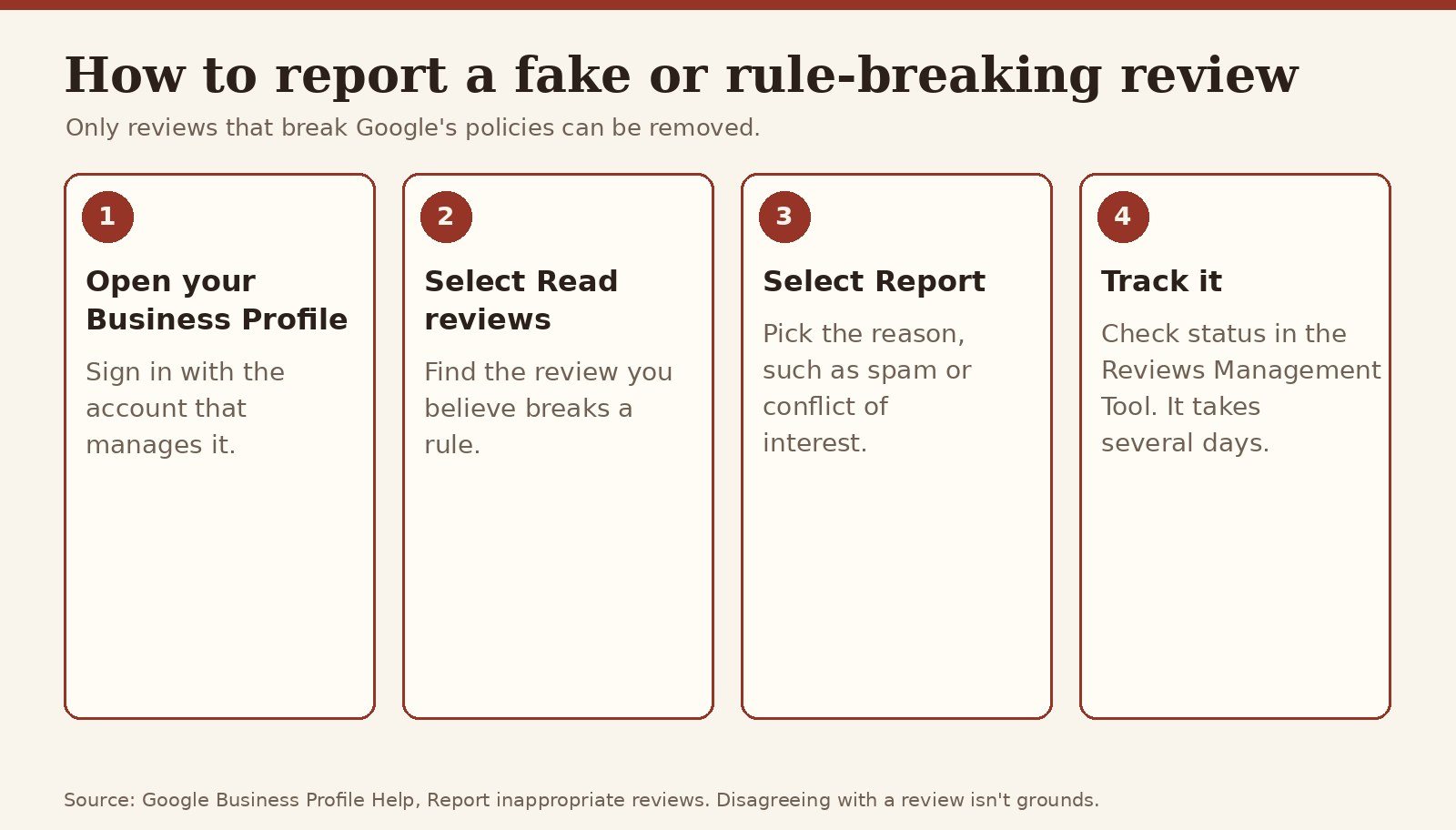
- Go to your Business Profile.
- Select Read reviews.
- Next to the review, select Report and pick the reason.
- Select Send report, then check its status in the Reviews Management Tool. Google says the review "typically takes several days" (Google).
If someone demands money to remove negative reviews, that's an extortion scam, and Google has a separate way to report it (same page). While you wait, post one calm reply so families see your side.
What should families look for in estate sale company reviews?
If you're a family comparing companies:
- Read the replies, not just the stars. A calm, specific answer to a 1-star review is a good sign.
- Look for details: the final check, communication, how the house was left.
- Watch for patterns. One "prices too low" review is normal. Ten that mention missing money aren't.
- Be wary of bursts. Google removes "unusual volumes or patterns of review contributions" meant to manipulate a rating (Google).
- Check more than one place, including Google, the company's EstateSaleFinder profile and the Better Business Bureau.
See our guides on how to find an estate sale company and estate sale red flags.
Show your reviews on your EstateSaleFinder profile
Your free EstateSaleFinder company profile has its own reviews section, and families can rate you there too. Ask in the same honest way, then link to your profile from your social posts (our social media guide) and your website. List your estate sale company to get started. Every company gets a 60-day free Pro trial.
FAQ
Can I offer a discount for a review?
No. Google prohibits discounts, payment or free services in exchange for a review. The FTC rule also bans incentives tied to positive or negative reviews.
Is it legal to ask only happy customers for reviews?
Google doesn't allow businesses to "selectively solicit positive reviews," so asking only happy clients breaks Google's policy. Ask everyone the same way.
How should I respond when the customer is wrong?
Reply once, calmly. Thank them, state the facts you can show, and invite them to call. Don't argue in public.
Can I get a fake review removed?
Yes, if it breaks Google's policies, such as a fake review, a competitor's review or a conflict of interest. Report it from your Business Profile and track it in the Reviews Management Tool.
What should families look for in reviews?
Look for specific details, calm replies to bad reviews, and patterns across many reviews. Check more than one site.
Can my employees review my company?
Only if they clearly disclose that they work for you. The FTC rule bars insider reviews that hide the relationship, and Google counts current or former employment as a conflict of interest. The simplest rule is: no staff reviews.
Related guides
Sources
- eCFR: 16 CFR Part 465, Rule on the Use of Consumer Reviews and Testimonials
- Federal Register: Trade Regulation Rule on the Use of Consumer Reviews and Testimonials
- FTC: Consumer Review Rule warning letter template (Dec. 22, 2025)
- Kelley Drye: FTC Warns Companies of Potential Violations of the Consumer Review Rule
- Greenberg Traurig: FTC Warns 10 Companies About Possible Violations
- Google Maps: Prohibited & restricted content
- Google Business Profile Help: Create a link or QR code to request reviews
- Google Business Profile Help: Tips to get more reviews
- Google Business Profile Help: Manage customer reviews
- Google Business Profile Help: Report inappropriate reviews
Sources checked November 11, 2026. Photos are Ai-generated illustrations; charts are EstateSaleFinder diagrams built from the sources above. This guide is general information, not legal advice. Google's policies can change; check the linked pages before you act.
Keep exploring
Ready to start your own treasure hunt?
Discover estate sales near you and find incredible deals.
Explore Sales Near Me
About the author
Andy
Founder, EstateSaleFinder.net
Hi, I'm Andy — a retired commercial photographer turned developer with a five-year (and counting) obsession with estate sales. I started EstateSaleFinder.net because I knew there had to be an easier, smarter way to find and list estate sales. Now I get to chase treasure and build the tool I always wished existed.