

Estate Sale Rewards Programs: Give Your Best Shoppers a Reason to Come Back
Your next sale is at a new house. Your shopper relationships do not have to start over. A practical guide to visit rewards, Hunter Pass, follower offers and company discovery—with actual screenshots.

In this guide · 15 sectionsShow
- 01The short version
- 02Why regular shoppers matter when every sale is at a different house
- 03Visit rewards, follower rewards and flyers: what is the difference?
- 04Step 1: Open the Shopper Rewards Center
- 05Step 2: Choose a template—or build your own reward ladder
- 06Step 3: Set the amount, milestone and any minimum purchase
- 07Step 4: Let buyers discover your company’s promotions
- 08Step 5: Show buyers their free Hunter Pass
- 09Step 6: Scan the pass at the Register and apply the reward
- 10Step 7: Check your Customers view and keep the program manageable
- 11Optional: Add a follower reward and a branded QR flyer
- 12A reward should support the sale—not quietly erode the proceeds
- 13A simple first-sale launch plan
- 14Frequently asked questions
- 15Keep building a business shoppers recognize
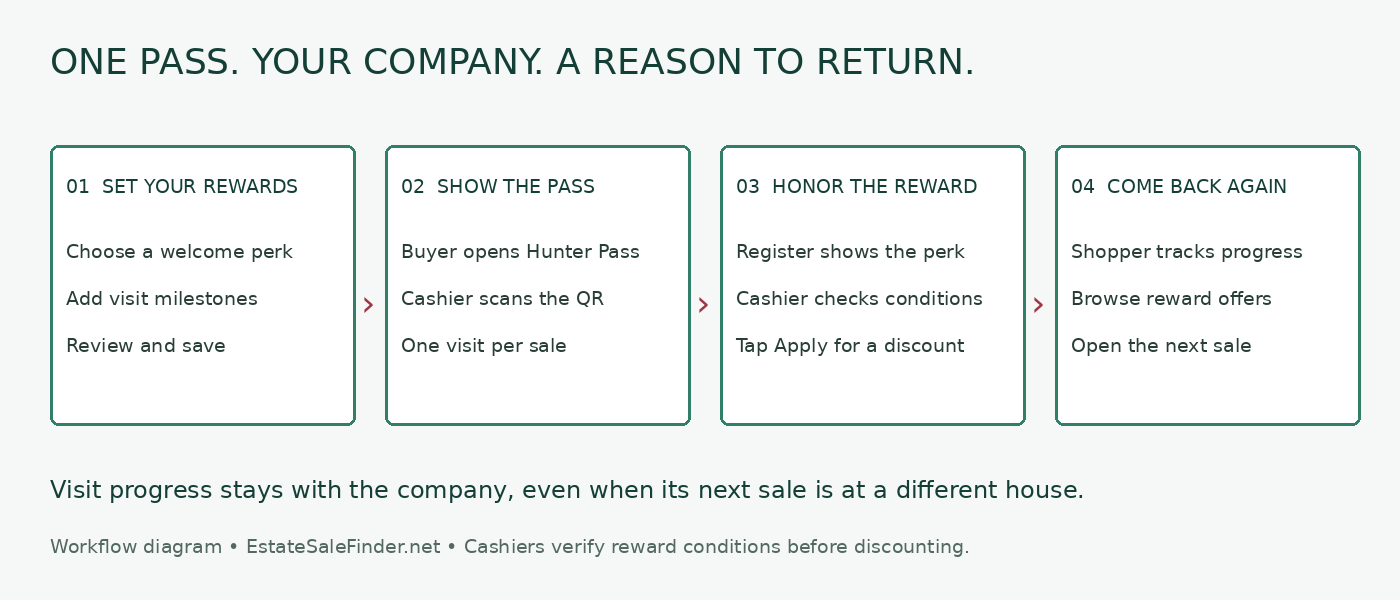
An estate sale rewards program gives shoppers a reason to return to the same company’s future sales. With EstateSaleFinder’s Shopper Rewards Center, companies choose welcome rewards, visit milestones and optional repeat perks. Buyers show their Hunter Pass at checkout; the cashier scans it, sees their progress and applies an eligible discount.
The house changes. The inventory changes. Your relationship with the shopper does not have to start over every weekend.
The short version
- For companies: choose your rewards in the Shopper Rewards Center, review the amounts, then save.
- For buyers: open the free Hunter Pass, show the QR code at checkout and keep earning with participating companies.
- For cashiers: scan the pass using the Register’s camera, read the earned reward and check its conditions before applying it.
- For discovery: buyers can look for companies offering promotions through Browse Rewards, where participating companies display their visit-reward offers.
- For consistency: each sale counts as one visit, even when a shopper’s pass is scanned again at that same sale.
- For your budget: rewards are your choice—not a requirement to discount every purchase.
About the visuals
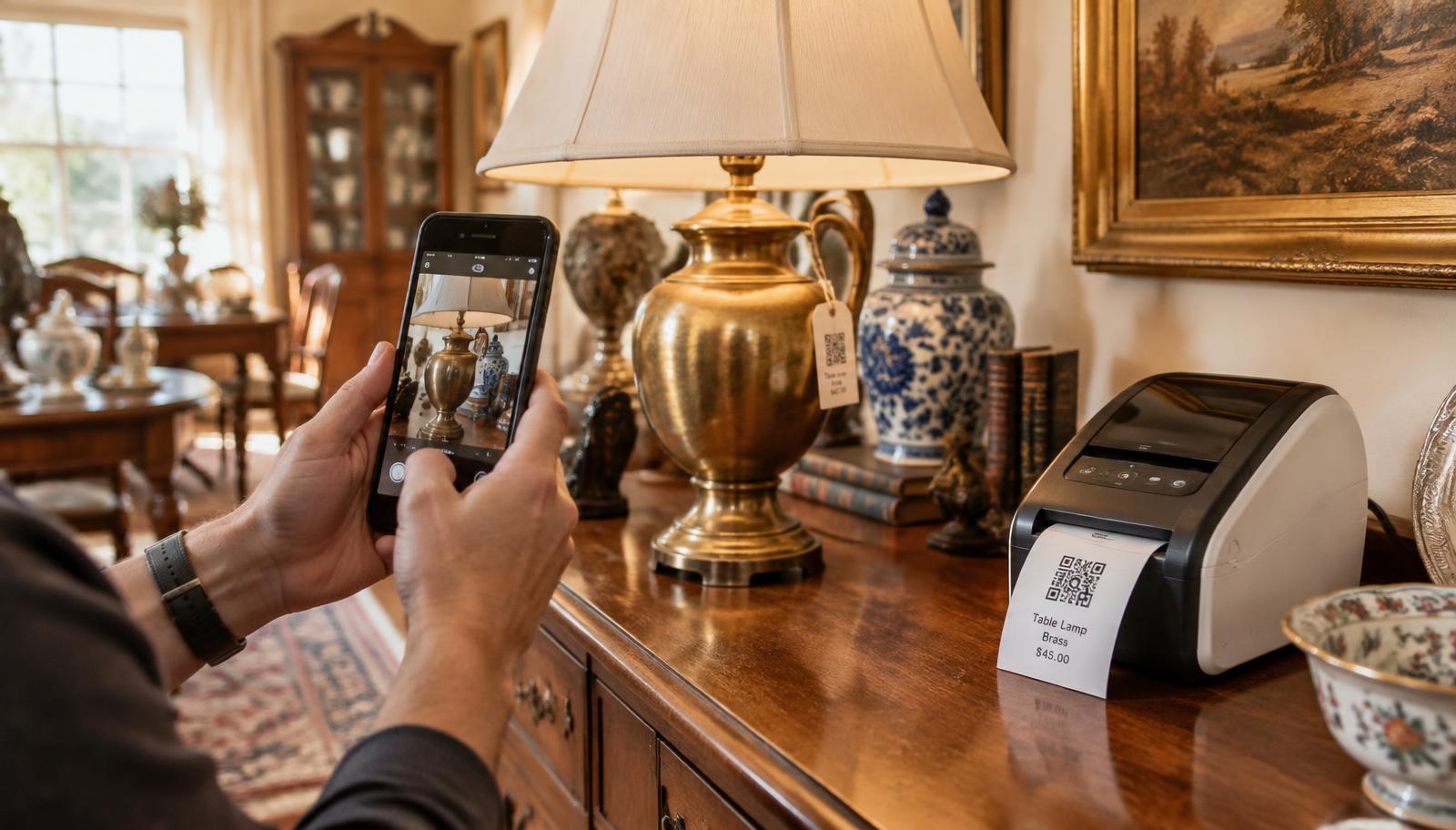
the screenshots below are actual EstateSaleFinder screens captured for this guide. The template example was reviewed without saving or publishing a reward. Personal details and the buyer’s QR code are hidden. The cover and the photograph of purchases are disclosed AI-generated editorial illustrations, not customer testimonials or photographs of a real sale.
Why regular shoppers matter when every sale is at a different house
Running estate sales means rebuilding the shopping destination each week. Last Saturday’s customer may have loved your organized checkout, fair prices and helpful crew. This Saturday, they still have to notice your next listing, decide the drive is worth it and remember which company treated them well.
A loyalty program makes that relationship more visible. Instead of asking buyers to remember a business name from a sign they passed once, you give them a pass that shows the companies they are earning with and the reward they are working toward.
The Rhode Island Small Business Development Center describes retention as a combination of appreciation, good service and staying connected—not simply chasing the next new lead. Its guidance supports rewarding loyalty and learning what customers want, without treating repeat business as guaranteed. 2
That distinction matters. Rewards cannot rescue poor pricing, unclear hours or an unpleasant shopping experience. They work best as a small, consistent thank-you alongside the things your company already does well.
The problems a thoughtful rewards program can help solve
“We keep advertising to people who have already bought from us.” New-customer advertising is still important. A visit program gives existing shoppers another reason to watch for your next sale instead of relying entirely on another paid post.
“Everyone waits for the last-day discount.” A milestone reward gives you a targeted way to recognize a returning shopper. It does not replace your markdown schedule or guarantee earlier purchases. But it lets you test a specific incentive rather than assuming a larger blanket discount is the only option.
“Our cashiers cannot remember who has been here before.” A digital pass records the visit with the company. Your crew does not have to recognize every face or rely on a shopper’s paper card.
“Our regulars feel invisible.” Progress toward a reward makes appreciation concrete. A buyer can see that their visits matter, even though each sale is at a new address.
“We want promotions, but we do not want to give away the family’s proceeds.” You choose the reward type, amount and milestone. Start conservatively, obtain any necessary client agreement, and judge the result using actual sale records.
For the wider marketing picture, our guide to advertising an estate sale explains how listings, photographs, email and local outreach work together. Loyalty is an addition to that plan, not a replacement.
Visit rewards, follower rewards and flyers: what is the difference?
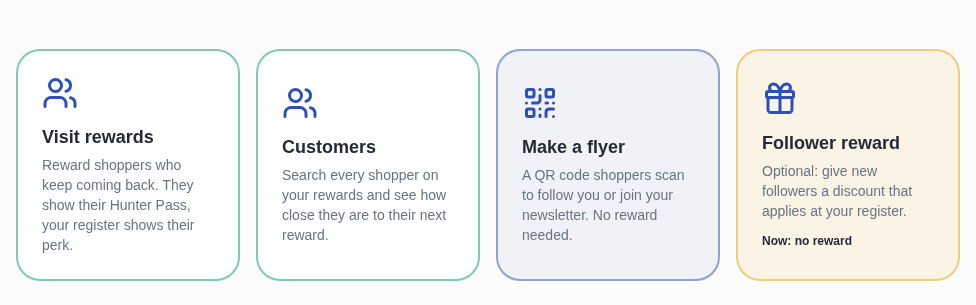
The Shopper Rewards Center brings four jobs together: Rewards, Customers, Follow and Flyer. They serve different purposes.
| Tool | What it does | A useful starting point |
|---|---|---|
| Visit rewards | Recognizes visits to the same company’s sales | Thank a buyer on a selected visit number |
| Customers | Shows pass customers and progress toward their next reward | See who is close to another perk |
| Follow | Offers an optional discount for following the company | Encourage buyers to keep up with future sales |
| Flyer | Creates a company QR flyer for following or newsletter signup | Make it easier to stay connected after checkout |
A buyer following your company is not the same event as a cashier scanning their Hunter Pass. Likewise, scanning a company’s flyer does not count as a sale visit. Keeping those differences clear prevents the “I scanned a code—why did I not get a punch?” conversation at checkout.
For estate sale companies, the Rewards Center and Register are Estate Pro and higher tools. Buyers can use their Hunter Pass for free. The current plan comparison explains access; this article covers the estate-sale workflow, not separate booth or auction plan rules.
Step 1: Open the Shopper Rewards Center
From your company dashboard, open Settings and find the Shopper Rewards Center. The direct page is Shopper Rewards Center. Choose Visit rewards to build the loyalty program.
You do not need to create a separate reward program for every house. Visit rewards belong to the company. That is what lets a shopper attend one of your sales now and continue earning at a different sale you run later.
Before entering any numbers, decide the simple sentence you want your team to say:
Show your Hunter Pass when you check out. We’ll count this sale toward your next reward with our company.
Then choose one business goal: welcoming first-time shoppers, encouraging a third visit, recognizing long-time regulars or inviting shoppers to build a qualifying cart. One clear goal is easier to explain than a long list of overlapping promotions.
Step 2: Choose a template—or build your own reward ladder
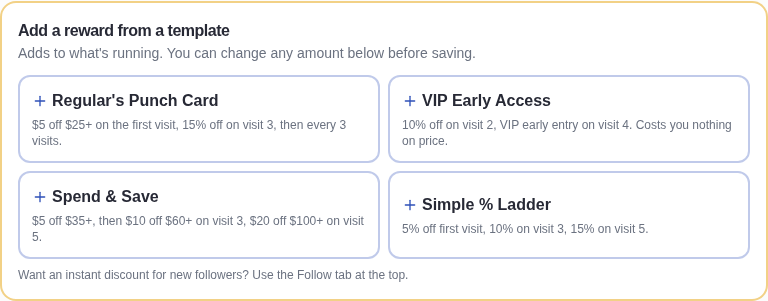
Four starter templates are available. They are editable examples, not mandatory discounts and not promises of a particular result.
| Template | Starting rewards shown in the editor | What to review |
|---|---|---|
| Regular’s Punch Card | $5 off $25+ on visit 1; 15% off on visit 3; then every 3 more visits | Whether both the welcome discount and repeat percentage suit your sales |
| VIP Early Access | 10% off on visit 2; a VIP 15-minute early-entry perk on visit 4 | Whether your venue, entry rules and crew can honor that perk |
| Spend & Save | $5 off $35+ on visit 1; $10 off $60+ on visit 3; $20 off $100+ on visit 5 | Whether qualifying purchases leave an appropriate margin |
| Simple % Ladder | 5% off on visit 1; 10% off on visit 3; 15% off on visit 5 | Whether the percentages fit your client agreement and markdown policy |
Templates add to your current setup. They do not wipe out the rewards you already configured. If a milestone’s visit number is already in use, the existing reward is retained. Review the full list rather than clicking several templates and assuming the result is a fresh replacement.
For the screenshot example, we selected Regular’s Punch Card. The editor displayed a welcome reward, a visit-3 reward and a repeating reward. Nothing was saved to the company’s live program.
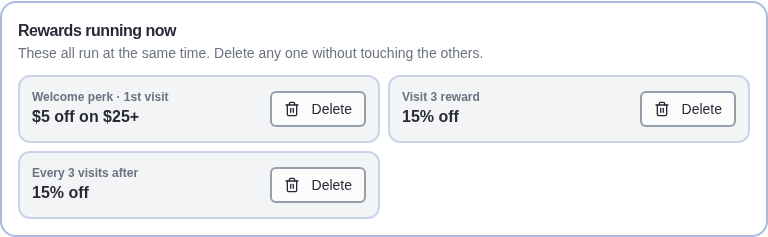
The Rewards running now section brings the configured rewards together. You can remove an individual reward without deleting the others. Check the on/off status as well: a configured reward is not earning while visit rewards are switched off.
Step 3: Set the amount, milestone and any minimum purchase
The editor offers three reward types:
- % off: a percentage discount.
- $ off: a dollar discount.
- Perk: your own wording for a benefit your company will honor.
A welcome reward is for the first visit. Visit milestones use the visit number you select. Keep rewarding after that lets you add a repeating interval after the last milestone.

How does the repeating reward work?
Repeating rewards start counting from the final milestone. In the Regular’s Punch Card example, the milestone is visit 3 and the repeat interval is 3. The next repeating rewards are therefore on visits 6, 9, 12 and so on—not a new reward on every visit after visit 3.
If you add a later milestone, review the repeat schedule again. The final milestone is the anchor. That small detail is worth explaining to your cashier before the first busy weekend.
What should a company choose first?
Start with a benefit you can describe in one sentence and comfortably honor. A percentage is easy to understand, but its dollar cost grows with the cart. A fixed amount is more predictable, while a minimum qualifying purchase can help avoid a large reward on a small transaction.
A perk can recognize loyalty without lowering an item’s price. But “no price discount” does not mean “no cost.” Early entry requires staff, clear instructions and a venue that allows it. It should never surprise shoppers already waiting under a different entry policy.
A Hunter Pass perk also does not automatically change your published hours, issue an entry ticket or create a paid pre-offer pickup appointment. Those are separate arrangements. Choose wording you can honor manually and explain it in your sale terms.
Our guide to discount days and negotiating is useful when deciding how a loyalty reward should interact with ordinary sale markdowns.
Step 4: Let buyers discover your company’s promotions
Turn on Show in Browse Rewards if you want your visit program to be discoverable. Make sure visit rewards are enabled, review the preview and choose Save visit rewards.

Yes—buyers can look for companies offering promotions. For visit-based promotions, the specific place is Hunter Pass → Browse Rewards. It brings participating companies and their reward ladders together so shoppers can compare what each company offers.

When a listed company has an enabled program, its entry can show the company name, city and state, welcome or milestone rewards, and a repeat reward if configured. A company link and an upcoming-sale link appear when available.
That makes the next step practical: a buyer sees a promotion, checks the company and opens its next sale. They still need to verify dates, hours, available items and posted terms before traveling.
Browse Rewards is a directory, not a guarantee of nearby results or a map ranking. This guide does not promise a ZIP-radius filter or a text-search box in that tab. At the time of screenshot capture, it had no participating programs to display; we have not fabricated companies or offers to make the directory look populated.
Listing is an additional discovery opportunity, not a promise of extra attendance. The strongest entry is still backed by a complete company profile, accurate upcoming sales and appealing item photos.
Step 5: Show buyers their free Hunter Pass
The shopper signs in to EstateSaleFinder and opens Hunter Pass. On My Pass, they see their personal QR code and a Show to cashier button. That button enlarges the code for scanning.
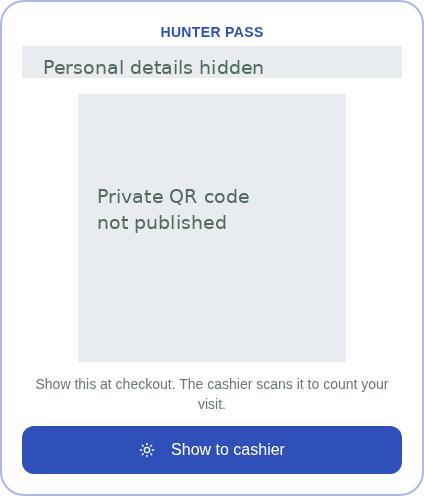
No separate loyalty app download is needed to open the pass in a phone browser. The shopper does need to be signed in. An installed shortcut can be convenient, but it is not a requirement for this workflow.
After a cashier has logged their first visit with a company, that company appears under Companies you’re earning with. The pass shows recorded visits, progress toward the next reward and a next-sale link when available. When the next visit qualifies for a reward, the pass can show it as ready on that next visit.
Each company keeps its own count. Visiting Company A does not earn a milestone from Company B. The buyer carries one pass, but the relationships and offers remain separate.
The friendly explanation is: “You do not need to keep a different paper card for every company. Show this pass, and each participating company keeps track of your visits with them.”
Step 6: Scan the pass at the Register and apply the reward
Open the sale’s Register. The same camera scanner that reads item labels recognizes a Hunter Pass. The buyer shows their pass; the cashier scans it.
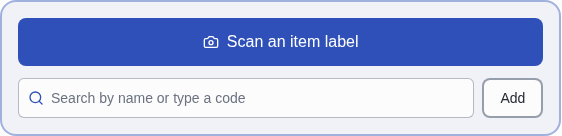
When the pass is read, the Register connects the shopper to checkout and logs their visit for that sale. It shows the company visit count and either the earned reward or the visits remaining until the next reward. The pass itself does not add merchandise to the cart.
For a percentage or dollar reward, the notification offers Apply. The cashier checks the terms and qualifying purchase, then taps it to set the checkout discount. For a custom perk, the crew honors the described benefit rather than expecting a dollar deduction.
Important: visit discounts are not silently deducted just because a pass was scanned. The cashier controls the Apply action. If you set a minimum cart, verify the purchase qualifies before applying. Also review any sale-day markdown or other promotion; do not assume separate rewards automatically combine or protect every condition for you.
Scanning again at the same sale does not produce another visit. A shopper who attends Friday and Saturday of that one sale still has one visit for that sale, not two. Their next distinct sale with your company advances the count again.
The visit is recorded when the cashier scans the pass, not when payment completes. Scanning is therefore a visit record—not proof of revenue, a purchase or a completed payment. Train the team to follow the same policy about when they scan.
For a clear overview of the wider item workflow, read Tag and Go: photographing, pricing and labeling. Item tags identify merchandise; a Hunter Pass identifies the returning shopper. Both can use the Register camera, but they do different jobs.
Step 7: Check your Customers view and keep the program manageable
Back in the Rewards Center, choose Customers. This is where you can search shoppers on your rewards, review their visits and see progress toward the next reward.
The view includes customer totals, repeat-shopper information and filters such as 1 visit away and Regulars. A new program can legitimately be empty. Customers appear as cashier-recorded Hunter Pass visits arrive; opening the editor alone does not create them.
This information can help you answer practical questions:
- Are shoppers attending another distinct sale with our company?
- Is the next reward easy to understand?
- Are cashiers remembering to scan passes consistently?
- Are the rewards we chose appropriate for the purchases we are seeing?
Visit progress is not the same as customer profitability. Compare it with your actual sale records and business costs. If you want to understand that distinction, our guide to how estate sale companies make money separates sales proceeds, commission and expenses.
Optional: Add a follower reward and a branded QR flyer
Visit loyalty answers “Why come back?” A follower reward answers “Why stay connected?” In the Follow tab, you can optionally offer a percentage or dollar discount for following the company.
Follower rewards have their own settings, including minimum purchase, validity period and, for percentage rewards, a maximum discount. They also have a choice between a one-time reward and a new reward for each sale. Review those rules before advertising the offer; they are not identical to the visit ladder.
A follower reward is issued through the following flow and redeemed at checkout. Simply being a follower does not mean a buyer has reached a visit milestone. Explain both offers separately if you run them together.
The Flyer tab lets you create a company QR flyer for Follow us or Newsletter signup. You can use it without offering any discount.
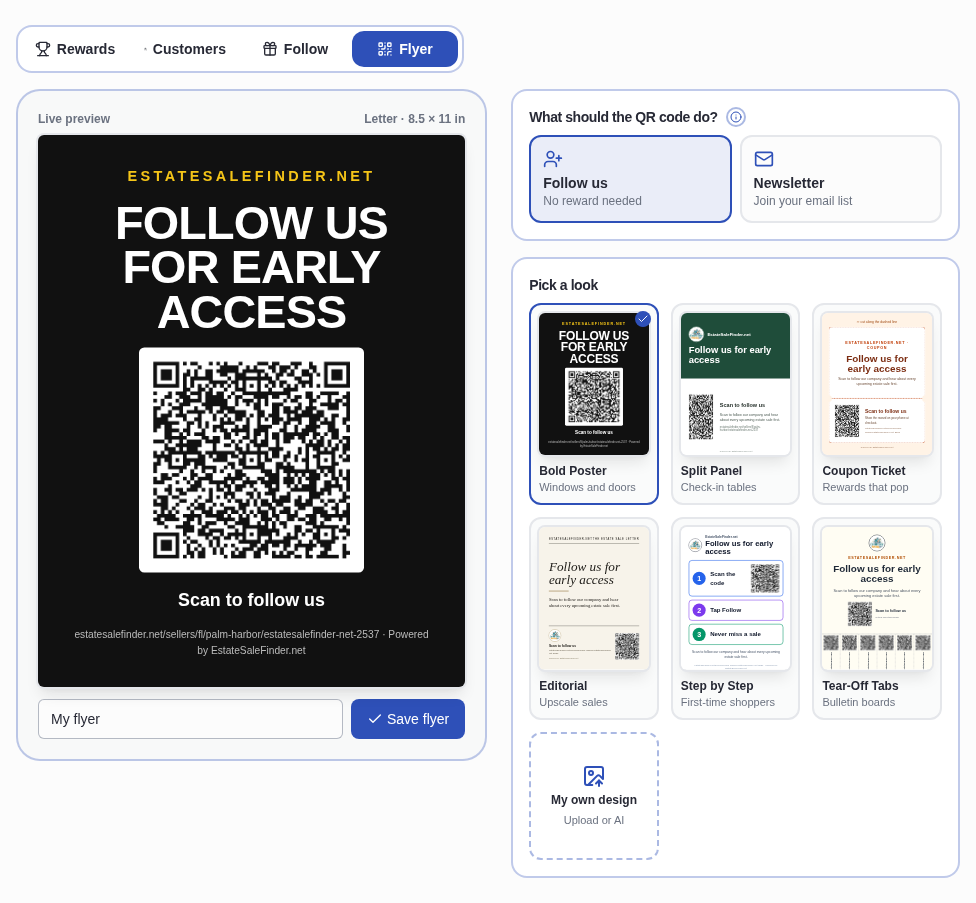
Choose a look that fits the setting: a bold poster for a window, a step-by-step design near checkout or a quieter editorial look on a welcome table. Review the wording before printing. A headline about early access is not permission to promise entry your company has not arranged.
The two QR directions are worth repeating:
- Shopper scans your company flyer: follows the company or joins its newsletter flow.
- Cashier scans the shopper’s Hunter Pass: records a visit with your company.
That is the entire difference. Do not tell shoppers that scanning a wall poster counts as attending another sale.
A reward should support the sale—not quietly erode the proceeds

Consider the Spend & Save template’s visit-3 example: $10 off a qualifying $60 cart. If the cart is exactly $60, that leaves $50 before tax and other adjustments. The reward equals about 16.7% of that cart. On a $100 qualifying cart, the same $10 is 10%.
Those are illustrations using the template’s actual amounts, not customer results. Whether the reward makes sense depends on the items, ordinary markdowns, client agreement and costs. A minimum purchase can encourage a shopper to consider another item, but it does not prove the additional purchase happened because of the reward.
Start small. Avoid comparing a reward weekend with a completely different house and calling every difference a loyalty success. Inventory quality, weather, sale size and local demand all affect results.
The goal is a sustainable thank-you: buyers feel recognized, your team can explain the terms, and the family’s proceeds remain part of the decision.
A simple first-sale launch plan
- Pick one template. Review every amount and remove steps you do not want.
- Agree on the terms. Check client approval where required, minimum purchases, markdown interaction and any practical perk restrictions.
- Enable and save. Turn on visit rewards and, if desired, Show in Browse Rewards. Use Save visit rewards.
- Brief the crew. Show the Hunter Pass scan, the earned-reward message and the cashier’s Apply step.
- Give buyers one clear instruction. “Open your Hunter Pass and show it when you check out.”
- Add a company flyer if useful. Keep following or newsletter signup separate from recording the visit.
- Review after the sale. Check visits, actual discounts and any confusing questions before adding more rewards.
Reward visits and participation—not positive reviews. Federal rules prohibit incentives conditioned on a particular positive or negative review sentiment. Keep review requests separate from loyalty offers. 2
A modest program that staff can honor reliably is better than an elaborate one that changes at the checkout table.
Questions & answers
Frequently asked questions
Can buyers find companies offering promotions?
Yes. For visit-reward promotions, sign in, open Hunter Pass and select Browse Rewards. Participating companies with enabled, listed programs can show their reward ladders and available company or upcoming-sale links. Other giveaways have their own promotion pages; they are not all the same as a visit program.
Is Hunter Pass free for shoppers?
Yes. Shoppers sign in and open their pass. Estate sale companies need Estate Pro or higher access for the Rewards Center and Register tools described here.
Can a company offer several rewards at the same time?
Yes. A welcome reward, visit milestones and an optional repeating reward can be configured together. The Rewards running now section brings them together, and individual rewards can be removed without deleting the rest.
Is it a points or spending-based program?
Visit rewards are based on recorded visits to distinct sales with the company. A reward can have a minimum qualifying cart, but the visit ladder is not a cumulative-spending points balance.
Does visiting twice during the same weekend count twice?
Not if it is the same sale. A pass records one visit per buyer per sale. Another distinct sale with the same company can count as the next visit.
Does scanning the pass automatically apply a discount?
No. The Register shows an earned reward, and the cashier taps Apply for a percentage or dollar discount after checking the conditions. Custom perks are honored by the company’s crew.
Does the program book early entry automatically?
No. An early-entry perk is a benefit the company must arrange and honor under its entry rules. It does not automatically change hours or replace separate pre-offer pickup arrangements.
What if the QR code will not scan?
Ask the shopper to use Show to cashier, increase screen brightness and hold the phone steady. Check that the Register has camera permission. Do not substitute scanning the company flyer: it is a different code with a different purpose.
Why is a company missing from Browse Rewards?
Check that visit rewards are enabled, Show in Browse Rewards is on and Save visit rewards was used. The directory needs the company’s available public profile as well. New or unpublished programs do not appear simply because someone opened the editor.
Will this guarantee more profitable sales?
No. Rewards can support retention, but attendance, purchase size and profit depend on the offer and the sale. Track actual records, choose affordable benefits and adjust the program based on what happens.
Keep building a business shoppers recognize
Your next sale may be in a different neighborhood, with completely different merchandise. A recognizable company, good service and a visible reward ladder give a regular shopper something familiar to follow.
If you already have company access, start with one reward in the Shopper Rewards Center. If you are comparing tools, explore the estate sale company features first. The goal is not more administration; it is an easier way to say, “Thank you for coming back.”
Continue reading
- Advertising a sale before opening weekend - Understanding discount days and negotiating - Tag and Go, item labels and sale-day checkout - Where company revenue goes - Building relationships with realtors
Checked November 26, 2026
workflow based on EstateSaleFinder’s current reward editor, Hunter Pass, visit rules and Register behavior. Actual app screenshots; no customer visit, sale payment or live reward program was created for this article.
Keep exploring
Give your regulars a reason to return.
Choose a reward your company can comfortably honor, show your crew the Hunter Pass scan, and keep the terms simple.
Open Shopper Rewards CenterAbout the author
Andy
Founder, EstateSaleFinder.net
Hi, I'm Andy — a retired commercial photographer turned developer with a five-year (and counting) obsession with estate sales. I started EstateSaleFinder.net because I knew there had to be an easier, smarter way to find and list estate sales. Now I get to chase treasure and build the tool I always wished existed.